
Model Overview & Print Notes
Summary
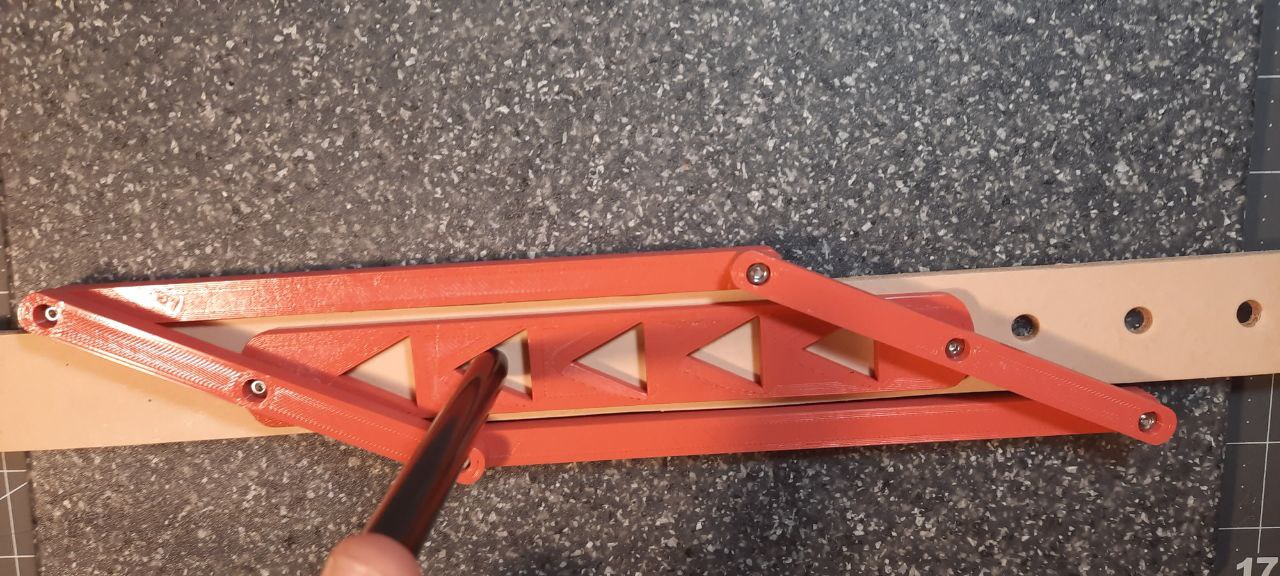
Punch guide for leather crafters!
requires 6 m3x6mm bolts, and 6 m3 nuts
lock nuts recommended but not required, they just may loosen on their own over time with use. Alternatively, use locktite on the nuts.
Print side.stl twice
Print topbottom.stl twice
Choose the centerguide stl file based on how far apart you want your punch spacing to be.
Spacing is center to center. Pictured above is CenterGuide3cm.stl.
The CenterGuideDouble files are intended to be used for punching straps for use with double prong buckles. The spacing is designed for 2" (50mm) wide straps. The punch centers are 13mm away from each side of the strap.
This thing is still a work in progress, feedback is welcome and appreciated.
Cheers
Print Settings
Printer Brand:
Creality
<p class="detail-setting printer"><strong>Printer: </strong> <div><p>Ender 3</p></div></p> <p class="detail-setting rafts"><strong>Rafts: </strong> <div><p>No</p></div></p> <p class="detail-setting supports"><strong>Supports: </strong> <div><p>No</p></div></p>
💬Thingiverse Community Comments(0)
★Thingiverse Original Reviews