
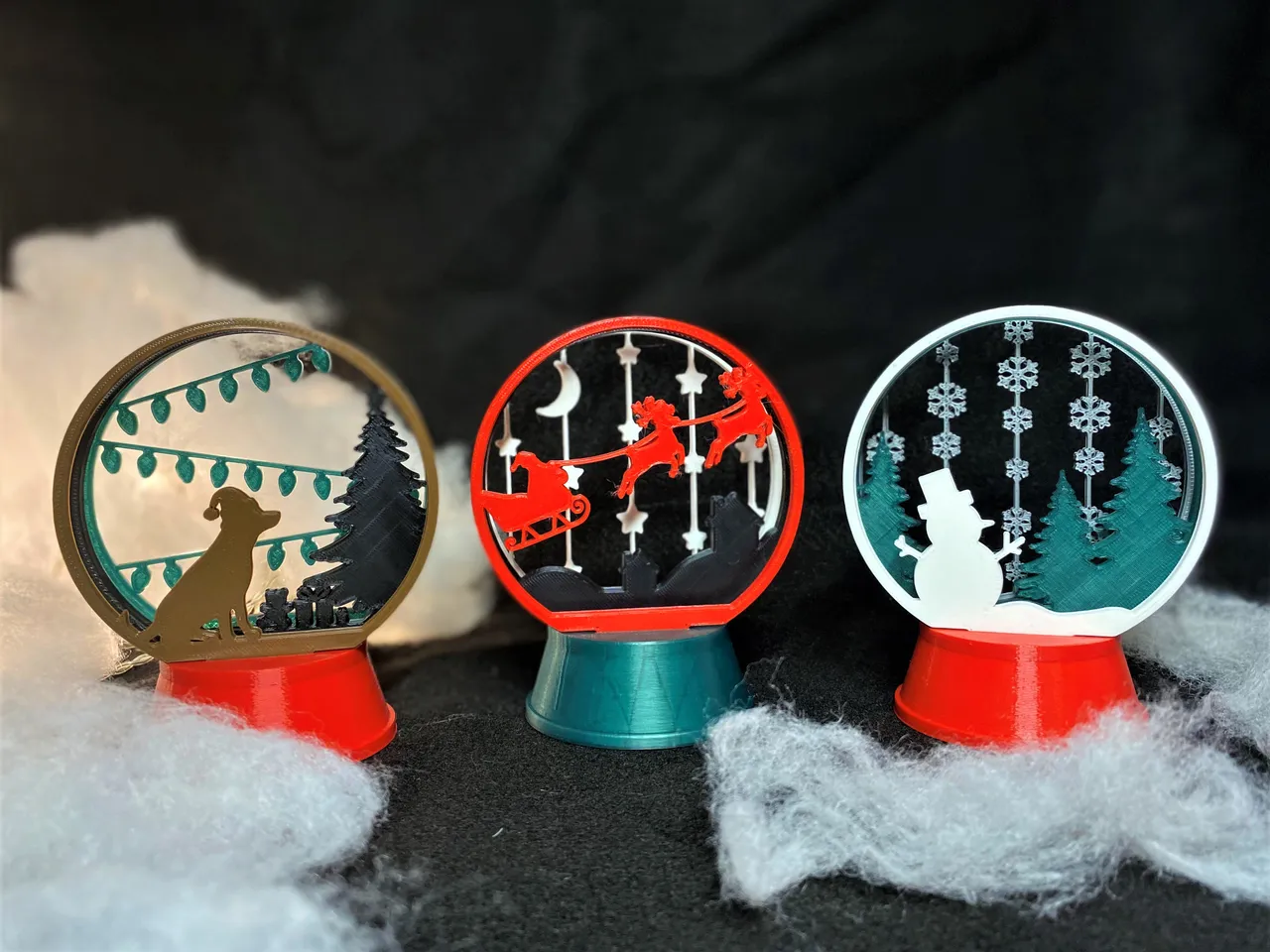
Model Overview & Print Notes
Looking for the ornament version? Check that out here!
Create your own snow globe by picking which panes to print and slotting them into the base! The base can support up to 3 panes, and there are 9 options (+1 blank pane) to choose from. A full snow globe can be printed/assembled in ~3.5 hours.
*UPDATE - I have uploaded a Base_LOOSE file which should have slightly larger slots (103%) to help with tight panels*
ASSEMBLY:
Print 1x Snowglobe_Base and 3x panes of your choice. Slot panes into the corresponding spots on the base. Depending on the tolerances of your printer you may want to add some superglue into the base, but it should be a reasonably snug fit. Best results come from printing/painting panes in different colors to create a layered effect.
TROUBLESHOOTING:
If the fit is tight you can try filing/deburring the sides of the tab to make it slide in easier, if the panes are too thick you can either clear out the slots in the base using the same method or scale the Z slightly down. I adjusted my Z height partway through printing these and noticed my parts didn’t want to fit anymore, so it might be an option for you as well.
Thank you all for all of your support and have a great holidays!
-Sconnie Makes

💬Printables Community Comments(151)
★Printables Original Reviews