
1/9
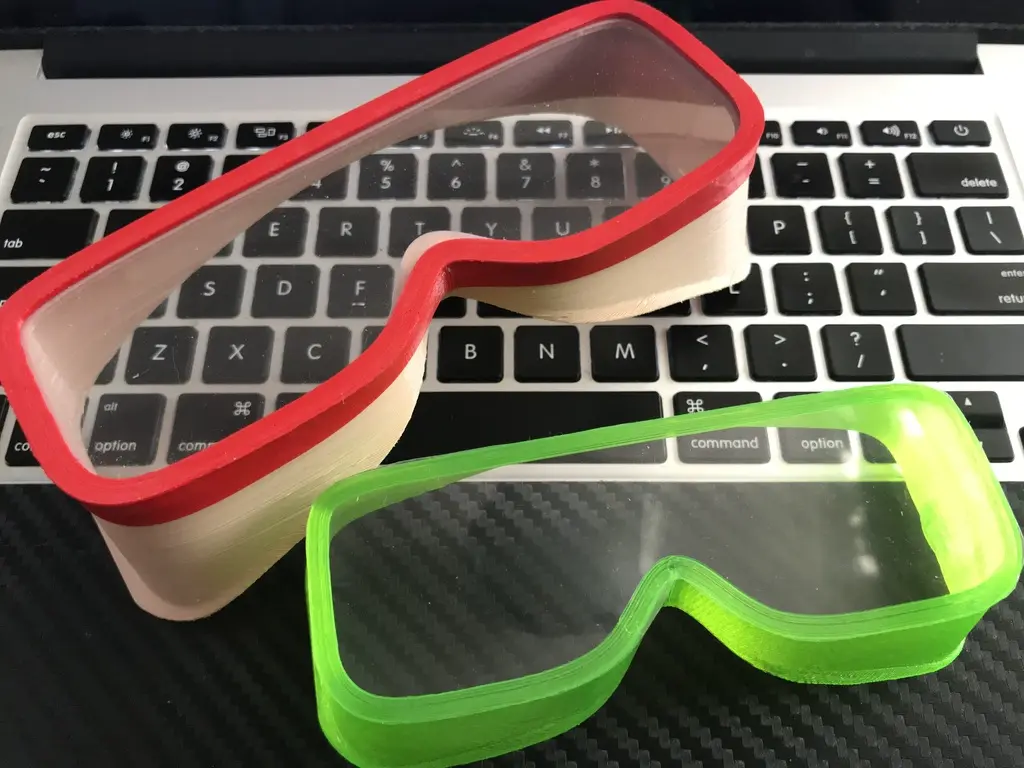
Model Overview & Print Notes
Yet another easy-to-print and usable pair of goggles. [Optimised for 3D Printing on Transparent Filament].
The goggles weigh 29 grams (stripe inclusive).
Speed Build Video:
https://youtu.be/TRsTjk00IgQ
Don't forget to subscribe to my channel: https://www.youtube.com/c/iczfirz
=====================================================
(---- Notice ----)
Set up a new Cura Profile
Material
- Generic TPU 95A (reminder: Cura default extruder setup is 2.86mm. You may need to set it to 1.75mm.)
Print Settings (Set up a new Profile based on the stock Extra Fast 0.3mm base profile)
- Custom
Profile
- Extra Fast - 0.3mm
Layer Height
- 0.3mm
Initial Layer Height
- 0.2mm
Wall Thickness
- 1.2mm
Fill Gaps Between Walls
- Nowhere
Seam Corner Preference
- None
Infill Density
- 100%
Build Plate Temperature
- 20°C
Build Plate Temperature Initial Layer
- 50°C
Layer Start X
- 0 (delta), or
- Max X size / 2 (Rectangle bed. Lower Left as origin)
Layer Start Y
- 0 (delta), or
- Max Y size / 2 (Rectangle bed. Lower Left as origin)
Skirt Line Count
- 3
**Fine-tune retraction (I use 5mm), speed (I use 60mm/s), and extra prime (I use 0mm) for your extruder and TPU.
Preview the slice result. Follow the checklist below (Picture from Rolley Mask but 4 walls for Goggles):


Addicted to 3D Printing? Watch these time-lapses! https://youtu.be/uNqqN5Ao_hI https://youtu.be/-ZsXFX6hjXk
 https://youtu.be/L4IDmn3miE0
 https://youtu.be/y3-0Y90HoYo

Why not make goggles from PLA?! It is brittle. Please research more about PLA before you start to print and/or design.
It is just TOO DANGEROUS to wear on your face; it is too brittle. If a PLA mask cracks, it will cut your face and eyes like a knife. A fatal scenario could be if something strikes your PLA mask, like poor Kevin in the following videos: For Part 1 in PLA please go here: https://youtu.be/ErP28uP4mVI For Part 2 in PLA please go here: https://youtu.be/LlN01EW9ORI For Part 3 in ABS please go here: https://youtu.be/feWsPd2XUFU For Part 4 in PET-G please go here: https://youtu.be/k-KhRx73NxU ===================================================== Files explained. Why Goggles_Top_Aligned? It gives the best 3D print result as there is no nozzle travel at all, resulting in zero oozing. The trade-off is that you need more time and TPU per print (39g vs 22g, 2h14m vs 1h25m). And you need to trim it with a pair of scissors.Set up a new Cura Profile
Material
- Generic TPU 95A (reminder: Cura default extruder setup is 2.86mm. You may need to set it to 1.75mm.)
Print Settings (Set up a new Profile based on the stock Extra Fast 0.3mm base profile)
- Custom
Profile
- Extra Fast - 0.3mm
Layer Height
- 0.3mm
Initial Layer Height
- 0.2mm
Wall Thickness
- 1.2mm
Fill Gaps Between Walls
- Nowhere
Seam Corner Preference
- None
Infill Density
- 100%
Build Plate Temperature
- 20°C
Build Plate Temperature Initial Layer
- 50°C
Layer Start X
- 0 (delta), or
- Max X size / 2 (Rectangle bed. Lower Left as origin)
Layer Start Y
- 0 (delta), or
- Max Y size / 2 (Rectangle bed. Lower Left as origin)
Skirt Line Count
- 3
**Fine-tune retraction (I use 5mm), speed (I use 60mm/s), and extra prime (I use 0mm) for your extruder and TPU.
Preview the slice result. Follow the checklist below (Picture from Rolley Mask but 4 walls for Goggles):
Addicted to 3D Printing? Watch these time-lapses! https://youtu.be/uNqqN5Ao_hI
https://youtu.be/-ZsXFX6hjXk
https://youtu.be/L4IDmn3miE0
https://youtu.be/y3-0Y90HoYo


💬CrealityCloud Community Comments(...)
★CrealityCloud Original Reviews