

Nylon interlocked adhesive pad (print Nylon on your PEI Sheet!!!)

Download, slice and print this model in the MakerSpell app — available on Android and Windows. Get the app
Model Overview & Print Notes
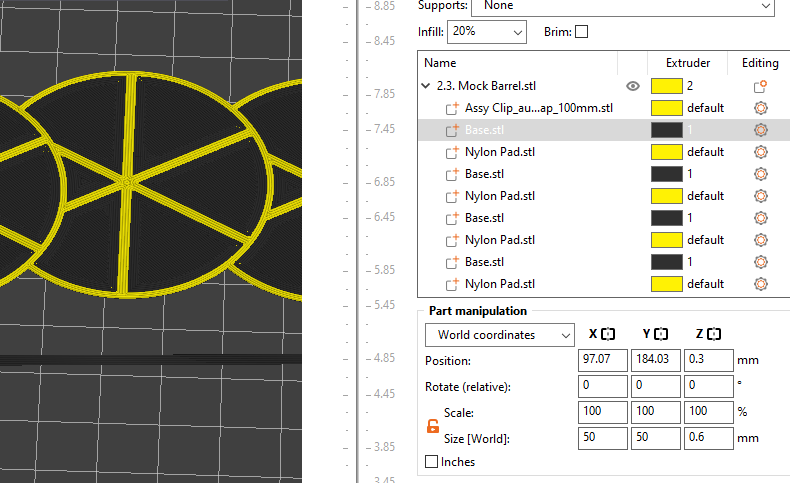
See "Example Print File.3mf" attached for reference. Using a multimaterial compatible printer, you can print any material onto an incompatible build plate surface with these pads. The idea is to print a base layer from a material that does stick to your build plate, and then a nylon pad on top of it that is mechanically interlocked with the base layer so it doesn't rely on interlayer adhesion. I used HIPS on a Creality PC (polycarbonate) build sheet for the base layer. The nylon will stick to the HIPS initially allowing you to print these few layers that interlock without it peeling off. Instructions: Use 0.2mm layer height only. Import the part you want to print. Right click on it in the part list and select: Add Part → Load … Select the two files (Base and Nylon Pad) Adjust the z-heights of your parts as shown in the photos and below: Base part z-position: 0.3mm Nylon Pad z-position: 0.7mm Main Part z-position: [part z dimension] / 2 + 0.6mm Change the material of the base part to your support material that will stick to the bed. Copy-paste the two parts as needed and tile it under your part so that it forms a raft layer. See "Example Print File.3mf" attached for reference.
💬Baskı İncelemeleri & Yorumlar(0)
★4.9 / 5.0· Başarılı Baskı