
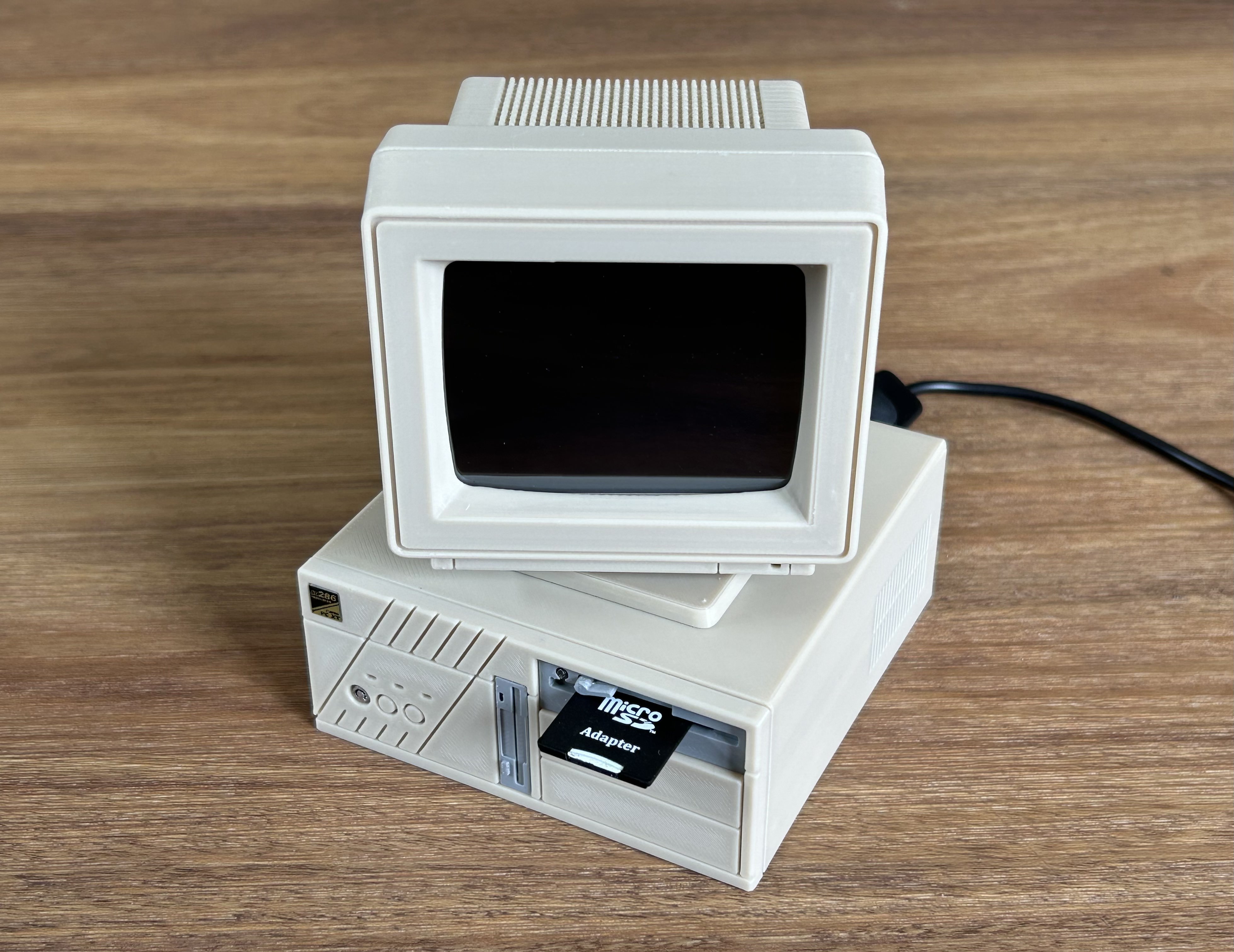

Retro Desktop PC Raspberry Pi case V2

Download, slice and print this model in the MakerSpell app — available on Android and Windows. Get the app
Model Overview & Print Notes
Thanks for checking out my work. If you like what I'm doing please give it a like and consider buying me a coffee ! For those in Australia without access to a 3D printer you can order the full 3D printed parts set from me here. Retro Desktop PC style case based on an old 286 PC I grew up with. Designed to fit a Raspberry Pi with a 3.5 inch HDMI MPI3508 LCD display. V2 features the following improvements over the original : Boot SD card reader placed in the 5.25 floppy drive that connects to the Pi's Micro SD card reader. Fan mounts in the desktop base for 2x 25mm fans. Improved front panel design enabling easier multicolour printing. The panel can also now be removed without needing to disassemble the rest of the desktop allowing for easier access to the Pi. Display brace allows for easier alignment of the 3.5" display inside the monitor shell when closing up. Rear I/O USB port so that the power cable can connect like a real PC instead of directly to the Pi. While there are more features in this version this is a more involved design compared to V1. If you'd prefer a simpler experience or don't need the SD card reader in the disk drive, I'd recommend checking out the original as cosmetically it's very similar with fewer additional parts to source. Alternatively you could also build it without the SD card reader cable or the fans. Please note that the Pi Zero 2W version has unique desktop parts that are not interchangeable with the other variants. This is due to the Pi Zero Micro SD slot position requiring a different SD extension cable (the other cable is not long enough for the Pi Zero to reach the drive bay). In addition to the print you'll need: Raspberry Pi (I used a 4B but you should print the parts that match your Pi) Pi Zero 2W to 3B adapter (such as this one ) - Required for Pi Zero to add rear I/O ports. 3.5 inch HDMI MPI3508 LCD display (such as this one ) Micro SD to SD Card flexible extension cable: For Pi 5/4B/3B/2B - The reader drive part has been specifically designed to fit the one in the link as others I tried were too big on the micro-SD side to fit the desktop base. The correct orientation for the SD reader is for the SD card to be inserted with label facing up. For Pi Zero 2W - Variant TF-SD 15cm. You will need to remove the plastic casing with a knife or tool in order to fit the reader into the drive bay. This cable can also be used for other Pi builds but you will need to print the Pi Zero 2W versions of the desktop parts. HDMI flat flexible cable 15cm (such as this one ): Pi 5/4B - Variants D2 + A2. Pi 3B - Variants A2 + A2. Pi Zero 2W - Variants C2 + A2. 1x 0.1m USB-C extension cable (such as this one ) to allow the Pi to be powered from the rear I/O panel. NOTE: Pi 5 will not work with ordinary USB extension cables and will need to use a USB PD capable cable (such as this one ). 1x M1.5x8 dowel pin (such as this one ) for the SD card drive latch. 40 pin GPIO extension cable (such as this one ). When assembling, try to keep as much of the extra slack in the monitor as possible to leave room in the desktop for the other cables. 1x M2.5x8 screw for securing the USB-C port brace to the desktop base. 4x M2.5x5 screws for securing the Pi to the desktop base. 4x M2.5x5 screws for securing the desktop case to monitor base. 1x M2.5x5 screw for securing the SD drive brace to the front panel back. 2x M2.5x8 screws for securing the desktop case to desktop base. 2x M2.5x8 screws for securing the display brace to the monitor front. 4x M2.5x8 screws for the monitor. Optional: Pi speaker expansion board (such as this one ). Dual 25mm fans connected to LCD display 5v pins (such as this one ). I also needed a JST 2-pin extension cable . 8x M2.5x10 screws for securing the fans to the desktop base. All parts except the following should be printed with supports: monitor connector front panel face front panel back drive latch display brace USB-C port brace I used eSun Bone White PLA but my options for a close matching beige were limited where I am. I used a Molotow Liquid Chrome marker to paint the front panel key lock. I used a label maker to print my front panel sticker. Credit to @Rooper for the rear monitor sticker. OS Configuration notes: I followed this guide by @Hypnza to get the Pi to boot into DOSbox with retro splash screen. Alternatively you can also install Dosbian by Carmelo Maiolino . I'm running DOSbox under Debian Bullseye (As of writing I couldn't get the custom splash screen to work under Bookworm). After installing the LCD-show display drivers I used the following values in my /boot/config to get the output to fit the monitor and rotate to the correct orientation: overscan_left=20 overscan_right=55 framebuffer_width=640 framebuffer_height=480 Add to the [all] section: dtoverlay=tft35a:rotate=270 display_rotate=2 Add the following if using the above linked audio module: dtoverlay=audremap,pins_18_19 If you have trouble rotating the display try commenting out the line below with a #: # dtoverlay=vc4-kms-v3c CHANGE LOG January 29 2025 Added extended version of Pi 4 desktop base. This should be used for Pi 4 builds that use the Pi Zero 2W TF-SD cable. December 5 2024 Added USB-PD cable port brace. November 13 2024 Uploaded Pi Zero 2W parts and notes. Added shop link. Added note for Pi 5 USB PD re: USB PD power extension cable. November 11 2024 Updated monitor back to reduce supports. Uploaded monitor back label. Added link to Dosbian by Carmelo Maiolino. July 5 2024 Uploaded revised desktop cover. May 28 2024 Added note to help with display rotation. March 12 2024 Updated desktop base rear I/O with USB-C port brace to fit a mini USB extension cable that runs from the Pi to the back of the desktop. This allows the main power cable to be plugged into and removed from the desktop back I/O instead of directly to the Pi port. The port brace has been designed to fit this 10cm USB-C extension cable . March 8 2024 Updated desktop bases and SD card drive to remove collision with side fan and allow for more slack for the SD card reader cable. Feb 2 2024 Tweaked overscan settings. Added missing display brace screws to additional parts list. Jan 20 2024 Updated monitor and display brace models allow allow 2 additional screws to fasten the bottom of the monitor halves together. An additional 2 screws are also required to fasten the updated display brace to the monitor front. Monitor power light moved to monitor connector part to allow for a different coloured print for the indicator. Added 80286AT sticker. Added monitor internal photos in the gallery. Jan 16 2024 Added additional boot/config.txt items Jan 13 2024 Added desktop base for Pi 2, 3, 5 Jan 4 2024 Fixed screw port alignment on desktop cover and base