

Klipper Printer Additions 3.0b9.1 - More Than Boring Start-G-Code
Download, slice and print this model in the MakerSpell app — available on Android and Windows. Get the app
Model Overview & Print Notes
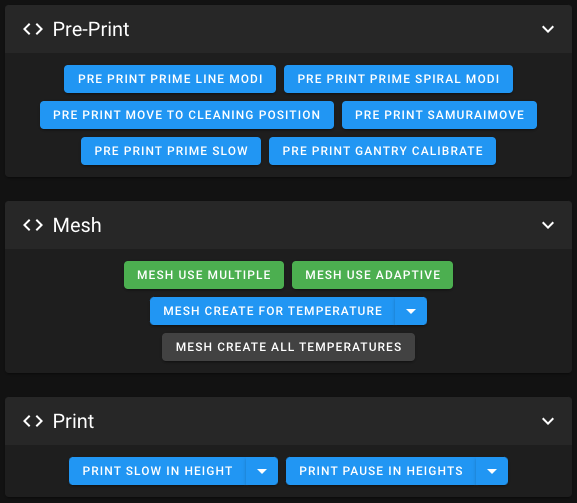
Please don't forget to like - I want my Prusameters! 😄 If you update from a previous 3.x beta, make sure to read the Release Notes, contained in the download. If you update from an 2.x release, please read the Setup Guide, contained in the download. 3.0 Beta-Release Notes, partial and ultra-compact: Fixed: “move out of range” errors. Fixed: "Extrude below minimum temp”. Heat Saturation for the bed and probe, against first-layer problems. New Button “PrePrint Prime Options”, to enter the flow rate (and thus print speed) of the Prime Spiral and Prime Lines. New buttons: Calibration Tools - buttons with guidance. Adaptive Probe Points for bed mesh. New button: Bed Mesh Organizer. Every button re-worked (more informative). All documentation re-worked, and in PDF-format. SV07 Fan Modules improved. Lots of other improvements. Klipper Printer Additions - More Than Boring Start-G-Code Quick Overview The Power of Klipper , and much more, baked into simple to use buttons . The KPA automate the whole pre-print procedure. Like a conductor, they give the right instructions at the right time, so that your print starts faster, without ouzing, and with better first layers. Adaptive Mesh Mode + Adaptive Purging/Priming. Save time by only probing the area where the model is printed. Multiple Mesh Mode + Adaptive Purging / Priming . Even speeds of light faster than Adaptive Mesh Mode. Bed Meshes are automatically created by bed temperature, saved, and re-used. In fine temperature steps of no more than +-5°C. Ridiculous 2025 probe points, but just for testing some things out. 😉 Adaptive Mesh Probe Point Count , Independent of your printer's bed size, the probe density is the same (and adjustable). This applies to Multiple- and Adaptive Mesh Mode. Faster Print Start , by heating smart, and without ouzing - you can print even without a skirt. Prime lines which clean better than regular prime lines, have anti-ouzing , and are very easy to remove . Prime Spiral which cleans in 360°, and indicates if your z-level is fine. Calibration Tools at your fingertips , no printer display required. For example, a fully automated and guided measurement of Rotation Distance Calibration! 😃 Print Slow In Height , can seamless reduce the printing speed on tall models. Very handy on bed slinger printers. Automated, or fully configurable, also during the print. Print Pause In Heights , pauses the print at desired points. Fully configurable, also during the print. Usability The KPA are easy to use , by simple buttons, which show you state and infos. Everything is directly accessible in Mainsail / fluidd. Easy to set up , by copy & paste. Minimal "invasion" of your printer.cfg (only one text line). Easy to update , by just uploading new files to the printer via Mainsail / fluidd. Easy Slicer Guides , without a single step missing, on how to set up your slicer app: OrcaSlicer / PrusaSlicer / Cura / IdeaMaker / Others. Guide , how to fix first layer problems on the hardware-side, and test-print-files. Guide , why and how to level a printer which calibrates the gantry with Z-Tilt. Modularity Most KPA modules can be enabled / disabled, to have the KPA customized as you want them. Bed Mesh Area Bed Mesh Multiple Bed Mesh Organizer Pre-Print Pre-Print Prime Tools Print Slow In Height Print Pause In Heights Calibration Tools Speed Heat Buttons Slicer OrcaSlicer Slicer PrusaSlicer Slicer Cura Printer Modules In addition there are extra Printer Modules, to plug-in additional functionality and bug fixes for specific printers. Currently: Sovol SV06/Plus Features Module More reliable probing for homing and bed meshes. Custom Gantry-Level method, that does not drive brutal into the gantry. No error "Move exceeds maximum extrusion". Improves PAUSE, RESUME and CANCEL_PRINT. Handles Filament Change commands from the Slicer (M600). Display stuck in startup-animation: Sometimes the displays of KlipperScreen / SV07 go into an endless startup-animation-loop, while the printer is still normally working via Mainsail. A missing preference of KlipperScreen causes this. This preference item is now created by the Klipper Printer Additions, so the display can exit the loop. Adds a 15-minutes-inactivity safety timeout, and it respects filament changes. Corrections for printer.cfgs with wrong values. Sovol SV07/Plus Features Module Cures most of the SV07's z-level / First Layer Problems. More reliable probing, for homing, z-tilt and bed mesh. Protects you from executing Z-Tilt manually, if printing with Z-Tilt is disabled, to safe you from bad first layers. No error "Move exceeds maximum extrusion". Displays the temperatures of the MCU and the MKS Pi. In Mainsail, fluidd, and the Printer's Display. Display stuck in startup-animation: Sometimes the displays of KlipperScreen / SV07 go into an endless startup-animation-loop, while the printer is still normally working via Mainsail. A missing preference of KlipperScreen causes this. This preference item is now created by the Klipper Printer Additions, so the display can exit the loop. Replaces Sovol's PAUSE, RESUME and CANCEL_PRINT Macros. Handles Filament Change commands from the Slicer (M600). Handles the print head's LED on print-start / print-end / print-cancel. Fully customizable to whatever behavior you prefer. Adds a 15-minutes-inactivity safety timeout, and it respects filament changes. Sovol SV07/Plus Part Fans Auxiliary Part Fan mode control: Dynamic, Permanent, Off (the modes are in detail explained when you click their buttons). You can also set a Speed Limit, and a Cool-Down-Timer. Nozzle Part Fan mode control: Dynamic, Permanent, Off. Sovol SV07/Plus MCU Fan Great noise reduction. Options: Full Speed (like factory) or temperature-controlled with variable speed. Sovol SV07/Plus Hotend Fan Great noise reduction. Options: Full Speed (like factory) or temperature-controlled with variable speed. All SV07 Temperatures & Fans More detailed Info and extensive documentation about the KPA… …can be found in the documentation in the download. Support If my work supports you, please support me too: • PayPal: https://www.paypal.com/paypalme/Morgennebel/ When you buy something, please use my Referral-Link, at no additional cost: • AliExpress: https://s.click.aliexpress.com/e/_De0Vu1h • Amazon: https://amzn.to/3L35OX2 Thank you! Christian 🙂 Disclaimer Use everything entirely at your own risk.