

Intro to Engineering Project #1: Ghost Model
Download, slice and print this model in the MakerSpell app — available on Android and Windows. Get the app
Model Overview & Print Notes
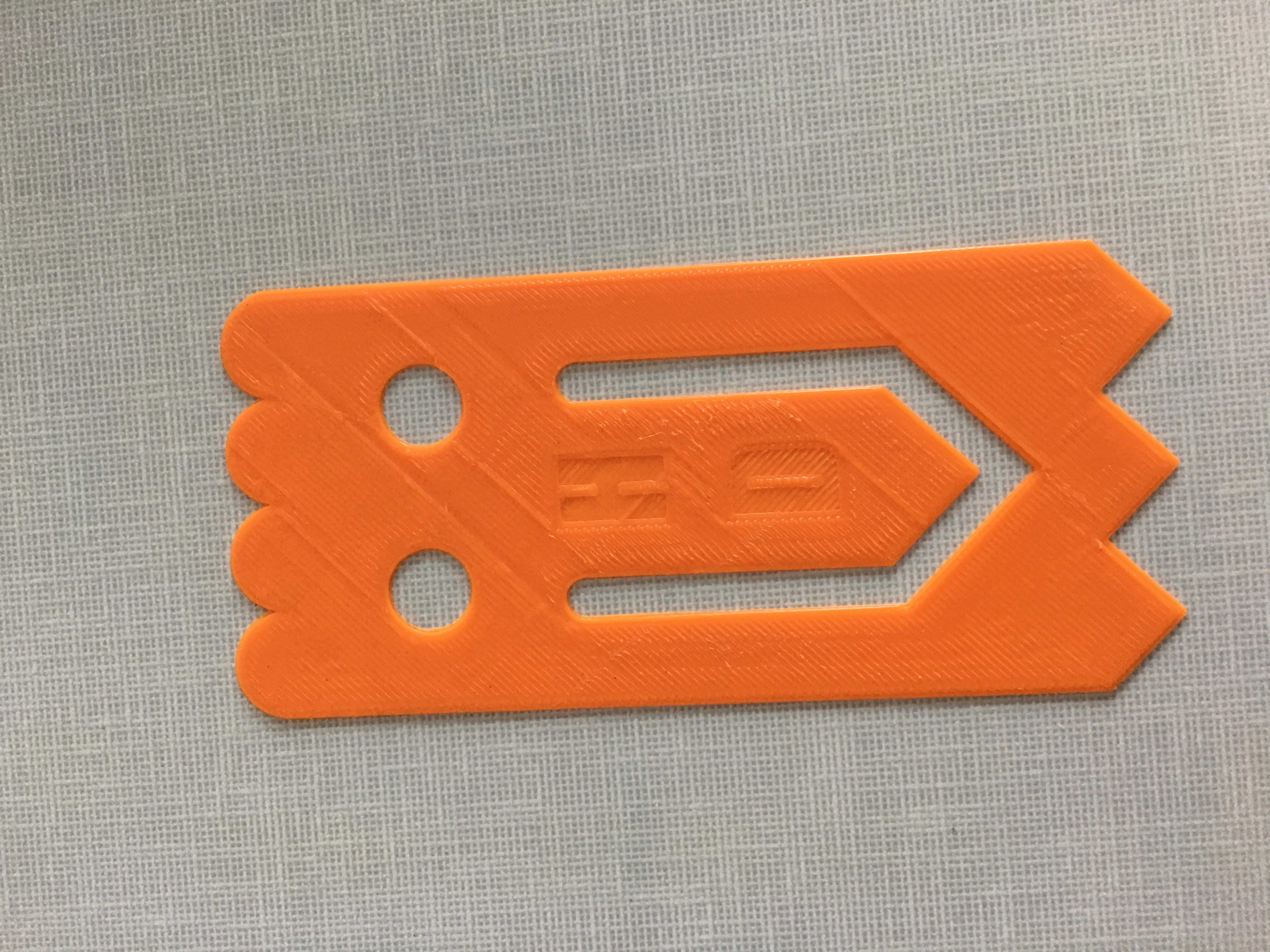
Lesson Plan: With a partner, you will recreate your ghost clip using Solidworks. You and your partner MUST have identical files that you create by collaborating on each step, one at a time. Construction Instructions: Select any plane, select center point rectangle, centered on the origin. Make a frame of the ghost, 13 cm by 6 cm. Use a construction line. Make a rectangular shape for the ghost, start from the top to down by 0.5 cm of the head, 11.5 cm by 6 cm for the body, 1.5 cm for the bottom, and 6 cm for the head line. Make four 1.5 cm lines that are set to construction about 0.5 cm below the top of the head. Make two construction lines that are set to 2 cm each and put it about 1.5 above the bottom of the body. Add 3 down-facing triangles on the bottom, the side length of the triangle is 1.5 cm, the down length is 1 cm, the total length of both side angles is 2 cm across. The total length across for all 3 should be 6 cm. Make the 4 top half circles to be 0.5 cm, have them across 1.5 cm, and the 4 of them should all be across the head a total of 6 cm. Make them tangent with the top line and the left line, then repeat. Create the left eye: the top of the eye circle should be 2.2 cm down from the very top of the head, and the bottom of the circle to the head should be 3.6 cm. The lengths between the circle edges should be 1.1 cm and the length from the left side of the ghost to the left side of the circle should also be 1.1 cm. Create the right eye. Follow the same instructions as for the left eye, but set the length between them to be 1.4 cm, or confirm that it is. If it is not, then something was done wrong and you should go back and check for mistakes. You could also use the mirror tool to create an exact copy on the opposite side if you want a quicker route. Make the general shape of one side of the mouth with only one line, this will be offset to form the mouth shape. Then make the right side of the mouth, the bottom right point of the mouth should be 1 cm above the top point of the middle, and 1.8 cm to the right of it. The left-right point of the mouth should be 1.2 cm to the right of the middle top point, and 1.2 cm above it. The gap between them should be 0.6 cm. Finally, add the respective lines from the middle points to the right points. Make the side lengths for the right side of the mouth. The top of the right side should be 4.7 cm above the far right point of the triangle. Before the half circle begins, the straight line should be 4.4 cm. Other line ends at the same mark. Make the half circle 0.3 cm above the end of the line. Mirror the right side of the mouth around the center axis created earlier. Once you have done that, try to connect the lines of the ghost model. After that, the ghost is complete. Review it and compare the design with the physical models of the ghost. Double check for any mistakes as well. Design Choices: Before me and my partner designed the ghost figure on Solidworks, we had to make some changes based on our instructions that we had originally planned on designing the ghost. Some of the changes were that the 6 cm line that was nearly above the head of the ghost, was originally set to geometry but we later set that line to construction, because the construction line worked better to cut the top of the head. Another change that we did was that the bottom of the eye circle to the head was originally 3.4 cm down below the top of the head. However, me and my partner later changed it to 3.6 cm down below the top of the head, because we thought that change would make the figure to be print exactly on how the other physical figures of the ghost are. Me and my partner were also planning to add some middle points for the mouth of the ghost in which the very bottom point of the ghost should be at the 3 cm mark of the length of the ghost, and 1.9 cm up from the very bottom. The point would of been directly above would of been about 2.9 cm above the bottom of the ghost. The gap between them would of been 0.8 cm. We would of also set a construction line between them, this will be an axis for later use. However, me and my partner decided not to use that plan, because we thought of a better plan on designing the ghost so that it can be exactly the way it is like the other physical figures of the ghost. We also made a change to the bottom right point of the mouth, because it was originally going to be 0.9 cm above the top point in the middle. However, we changed it to be exactly 1 cm above the top point, because we thought that change would make our designs of the ghost to be exactly the same as the other physical figures of the ghost. We were originally going to have a gap that is between the right-left point and the left-right point in the middle of the mouth to be 0.5 cm, but while we were designing the ghost figure, we decided to have that gap to be 0.6 cm instead of 0.5 cm. We decided to make that change, because it would our designs of the ghost to be exactly the same as the other physical figures of the ghost. We also add an instruction while we were designing the ghost and it was to make the half circle of the top of the mouth to be 0.3 cm, because while we were designing our models, we decided to measure the ghost again, and while we were measuring, we measured the half circle of the top of the mouth. The half circle measured about 0.3 cm. When me and my partner measured the half circle, we decided to set the half circle of the top of the mouth to be 0.3 cm. So that was the only instruction that me and my partner added while we were working on our designs of the ghost. Overall, those were some of the steps that was changed while me and my partner were working on the ghost.