PrintablesPrintables✓ Verified Model

Malolo's screw-less / snap fit Raspberry Pi 4 Model B Case & Stands

🎨
MaloloCreator & Artist
View Source ↗
⬇ Downloads12.7K
♥ Likes2.2K
👁 Views—
⚙ Print ReadyPrint Ready
Printables↗
Direct Bridge:

Download, slice and print this model in the MakerSpell app — available on Android and Windows. Get the app

Model Overview & Print Notes

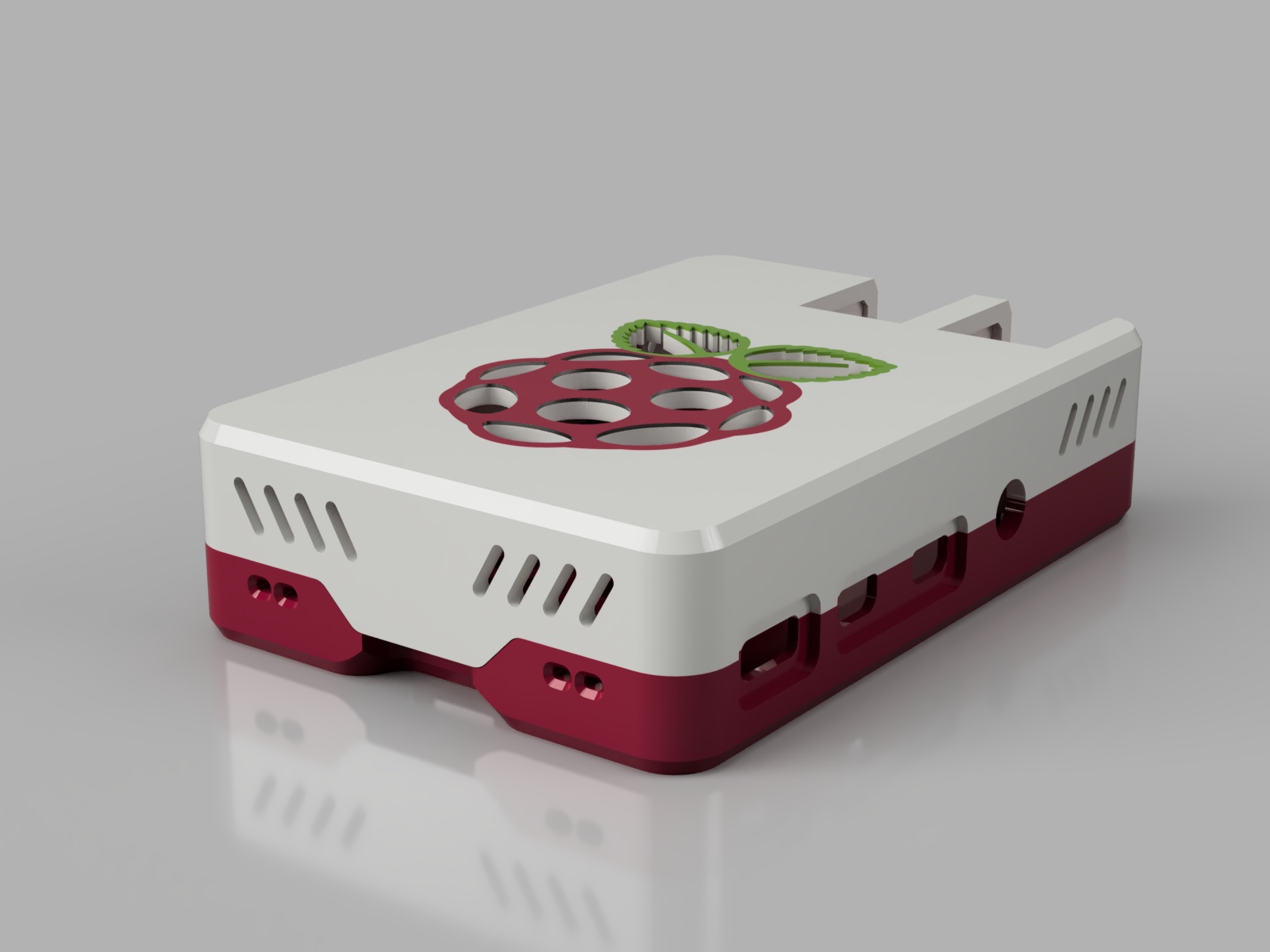
Please note: This is an adapted version of my Raspberry Pi 3 case ( https://www.prusaprinters.org/prints/4038-malolos-screw-less-snap-fit-raspberry-pi-3-model-b ) that I modified to fit the Raspberry Pi 4. I do not yet own the Raspberry Pi 4 myself. However Thingiverse user Haz1 ( https://www.thingiverse.com/Haz1/about ) was kind enough to patiently print several iterations of the case and send me pictures to check the fit. Thank you Sebastian :-). Since I did not yet print this thing the pictures only consist of a few renders. If you want to see how it will look printed please have a look at the Raspberry Pi 3 version ( https://www.prusaprinters.org/prints/4038-malolos-screw-less-snap-fit-raspberry-pi-3-model-b ). It's the identical case but with a few differences due to the different board layout of the Raspberry Pi 3 . There already is a plethora of raspberry pi cases on the internet and the last thing we need is yet another one ... well - I created one anyway ... because I wanted to and I had a lot of fun doing it :-). I tried to achieve the following key features: Easy to print without support (no steep overhangs or long bridges and stuff). Top and bottom layer printable on print surface (so I could make good use of my recently acquired awesome powder-coated/textured print sheet). No screws or glue needed (snap fit). Slim/compact outline. Acceptable ventilation without fan. Good looking (very subjective - I know). I also wanted a stand to put it on. I tested the Raspberry Pi 3 version with 0.2mm and 0.1mm layer height. Both worked well so this settings will also work for the Pi 4 version. I would recommend to use PETG for better heat resistance. If you have any questions, suggestions or requests don't hesitate to let me know. Designs There are several different designs for top and bottom Bottom Base design without ventilation holes Hexagonally shaped ventilation holes Simple slot shaped ventilation slots Hexagonal mesh covering the whole bottom Top Base design without ventilation holes Hexagonally shaped ventilation holes Raspberry logo as ventilation holes Simple slot shaped ventilation slots Hexagonal mesh covering the whole bottom Stands There are three different stands Vertical stand Horizontal stand Flat stand The vertical one also has a version that routs the Rasberry Pi status leds to the front. To achieve this you have to print the file "Stand_Vertical_LED_Guide.stl" twice using a transparent filament and slide it into the according holes of file "Stand_Vertical_LED.stl". It's difficult to explain - just have a look at the pictures. OpenSCAD Customzier scripts Since I wanted to add more variants and features but still give people the choice which features they want, I came up with a solution in form of OpenSCAD Customzier scripts. The model itself isn't designed in OpenSCAD. The scripts just cut/combine different imported stl meshes to generate the desired result. I still added some ready-to-use stl mesh files but none of those contain accessory slots (for camera and display cables or to have access to the pins). If you need those you can generate a custom stl file via the customizer scripts. Please note: OpenSCAD really does an excellent job at combining mesh files (unlike Meshmixer which is a bit of an irony). The rendering process may take a few minutes though. Important: For the customizer scripts to work properly you will need all of the stl mesh files that start with "z ". Using the customizer: Download and run OpenSCAD . I highly recommend to get the latest 2019.05 version since that one has a built in cutomizer gui. Open one of the scripts in OpenSCAD (the files named "...Color1..." are used for single material prints as well). Press "F5" on the keyboard to show a preview. Unfortunately the regular preview has some glitches. To get a less accurate but better looking preview of the end result press "F12" to switch to the "throw togehter" view. You can rotate the preview by pressing and holding the left mouse button and moving your mouse On the right side of the window you will see the customizer. There are several categories that you can expand to reveal the setings they contain. Choose the settings you like. Changes should be displayed almost instantly. To render the final result press "F6". To save the result as stl file press "F7". Cooling fans There are two options to mount a 30mm or 40mm cooling fan: Screwless version with rails/sled (see image) This is designed to fit a 30mm PI-FAN or a 40mm Noctua NF-A4x10. Others may fit as well but I only tested those two. The orientation of the sled matters. Make sure you slide it in the correct way. Scew holes This should work for all fans - just use screws to attache the fan as you normally would. Hint: You do not have to use a dedicated fan hole. You could for instance just use the mesh version and only add screw holes. The Hex or Logo versions might also work very well without a dedicated fan hole. Multi-Color printing I don't have a multi material printer but learned that you can create a multi material print pretty easily without special hardware (as long as the multi material part does not span over to may layers - otherwise it gets a pita). By multi material I don't mean switching filament at certain layers (which would not have worked in my case because I wanted the top and bottom layers to be on the print surface) but a true multi color print (as seen in the pictures). Here is a short instruction of how it works: I used Prusa Slicer for this but I guess it would work with the original Slic3r in a similar way Setting up Prusa Slicer In Prusa Slicer go to the "Printer Settings" tab. In the "Printer Settings" tab go to "General" settings. Under "Capabilities" increase the number of extruders to the number of colors you want to print. For each extruder you will get an entry on the settings list on the left ("Extruder1", "Extruder2", "Extruder3", ...). I would recommend to change the "Extruder Color" under "Preview" in the extruder settings for each extruder. This is not important but it will give you a better preview of the result making life a bit easier. In the "Custom G-code" settings add "M600" to the "Tool change G-code" (M600 is the G-code command for a manual filament change). Setting up you print The versions of the case that are intended for multi color printing have each color in a separate STL file. On the "Plater" tab click the "Add" button and select the STL files for all colors at once ("at once" is important here). When more than one extruder is configured and you add more than one file at once Prusa Slicer will ask you "Multiple objects were loaded for a multi-material printer. Instead of considering them as multiple objects, should I consider these files to represent a single object having multiple parts?". Answer "yes" to this. Check the preview to make sure the colors are what you want. If the colors are not correct you can change them by assigning another extruder in the STL file list on the right (second column). Hit "Slice now" an transfer the G-code to your printer. Printing Whenever your printer reaches the M600 command it will pause outside the print area and prompt you to switch filament (supposedly your printer supports the M600 G-code command). Some Tips The order in which filaments are changed is not consistent. I got around this problem by adding the M600 command to the custom Tool change G-code setting as follows "M600 ; Switch to Extruder [next_extruder]". "[next_extruder]" is a placeholder that will be replaced during slicing. I then exported and opened the G-code file in a text editor and searched for the M600 command. I then created a checklist for each filament change to keep track of which filament has to be inserted next. Please keep in mind that extruder numbers in the G-code file are zero based. This means that extruder 0 in the G-code file is actually "Extruder1" in the Prusa Slicer UI. When using the Original Prusa i3 MK3 the printer will extrude quite a bit of filament right after you confirm completion of the filament change to build up nozzle pressure. To avoid this extruded filament to be be dragged over to your print and make a mess don't remove the filament that is extruded during the filament change, so it will be easier to grab the whole thing. Before confirming completion of the filament change get ready to pull the filament waste away when the print head starts moving. This all probably sounds more complicated then it is. Once you understood how it works it's actually pretty straight forward. Naming scheme for STL files There are quite a few different versions of STL files. There are different designs and for each design there are different options with regards to slots for camera and display cables and an access slot to the pins. To help you pick the right files I used the following naming scheme: Function Bottom = bottom part Top = top part Designs Base = base design without ventilation holes Hex = hexagonally shaped ventilation holes Logo = raspberry logo as ventilation holes Slots = simple slot shaped ventilation slots Multi Material SM = single material MM = multi material (X = number of different colors) Accessories Cam = contains a slot for camera cable Disp = contains a slot for display cable Pins = contains a slot for access to the pins If you are unsure which file to pick just open it in your slicer and see what it looks like. Updates 2019-09-28 OpenSCAD Customzier scripts have been added Several versions with cooling fan support have been added New case style "Mesh" for top and bottom has been added

Files (259)

STL
Top_Logo_SM.stl
Size: 2773184
STL
z_top_h20_style_pihole_sm_cut.stl
Size: 532084
STL
z_top_h20_cam_slot_fan40_border.stl
Size: 37484
STL
z_top_h20_cam_slot_fan40_cut.stl
Size: 18684
STL
z_top_h20_right_mesh_cut.stl
Size: 45184
STL
z_top_style_hex_sm_fan40_cut.stl
Size: 3084
STL
z_top_cam_slot_border.stl
Size: 37484
STL
z_top_style_hex_sm_fan30_cut.stl
Size: 8084
STL
z_top_h20_base_sm.stl
Size: 497084
STL
z_top_h25_left_mesh_cut.stl
Size: 55684
STL
z_top_h20_front_slots_cut.stl
Size: 182484
STL
z_top_h20_cam_slot_cut.stl
Size: 18684
STL
z_top_h25_cam_slot_style_slots_fan40_cut.stl
Size: 18684
STL
z_top_style_hex_mm2_fan30_cu_c1t.stl
Size: 17684
STL
z_top_h25_style_hex_mm2_c2_base.stl
Size: 93684
STL
Case_Top_Color2.scad
Size: 5292
STL
z_top_cam_slot_style_slots_fan40_cut.stl
Size: 18684
STL
z_top_h25_style_slots_sm_fan30_pin_slot_cut.stl
Size: 90684
STL
z_top_h25_style_pihole_solid_mm4_c4_base.stl
Size: 84384
STL
z_top_h25_fan30_hole_cut.stl
Size: 37284
STL
z_top_style_hex_mm2_c1_fan30_cut.stl
Size: 17684
STL
z_top_right_rear_slots_cut.stl
Size: 165684
STL
z_top_h20_fan40_hole_cut.stl
Size: 37284
STL
z_top_h20_style_logo_mm3_c2_base.stl
Size: 314484
STL
z_top_h25_style_slots_sm_cut.stl
Size: 167884
STL
z_top_h25_style_slots_sm_fan40_cut.stl
Size: 68884
STL
z_top_h25_fan30_rails.stl
Size: 149084
STL
z_top_h25_style_hex_mm2_c1_fan30_cut.stl
Size: 39684
STL
z_top_h25_style_pihole_sm_cut.stl
Size: 532084
STL
z_top_h25_style_hex_sm_fan40_cut.stl
Size: 13084
STL
z_top_cam_slot_style_slots_cut.stl
Size: 18684
STL
z_top_h25_fan40_screws_cut.stl
Size: 217684
STL
z_top_h20_style_hex_mm2_c2_base.stl
Size: 93684
STL
z_top_h20_disp_slot_border.stl
Size: 37484
STL
z_top_h25_style_hex_mm2_c1_cut.stl
Size: 85884
STL
z_top_h20_style_hex_mm2_c1_fan30_cut.stl
Size: 39684
STL
z_top_style_logo_mm2_c2_base.stl
Size: 551284
STL
z_top_h25_fan30_screws_cut.stl
Size: 213684
STL
z_top_h20_style_slots_sm_fan40_pin_slot_cut.stl
Size: 71884
STL
z_bottom_style_hex_mm2_c2_base.stl
Size: 93684
STL
z_top_cam_slot_style_hex_cut.stl
Size: 18684
STL
z_top_style_slots_sm_fan30_cut.stl
Size: 36084
STL
z_top_h20_fan30_hole_cut.stl
Size: 37284
STL
z_top_style_slots_sm_cut.stl
Size: 117084
STL
z_top_h20_style_hex_sm_fan30_cut.stl
Size: 18084
STL
z_top_style_pihole_mm4_c4_base.stl
Size: 160184
STL
z_top_h20_style_pihole_mm4_c1_cut.stl
Size: 367784
STL
z_top_h20_cam_slot_style_hex_fan40_cut.stl
Size: 18684
STL
z_top_fan30_hole_cut.stl
Size: 37284
STL
z_top_h20_fan30_hole_border_sm.stl
Size: 73084
STL
z_top_h20_pin_slot_border.stl
Size: 24084
STL
z_top_h25_style_mesh_sm_cut.stl
Size: 331284
STL
z_top_h25_right_rear_slots_cut.stl
Size: 79284
STL
z_top_h25_style_slots_sm_fan40_pin_slot_cut.stl
Size: 71884
STL
z_top_h20_style_pihole_mm4_c3_base.stl
Size: 162284
STL
z_top_fan30_rails.stl
Size: 165084
STL
z_top_h25_disp_slot_cut.stl
Size: 18684
STL
z_top_h20_style_slots_sm_pin_slot_cut.stl
Size: 175284
STL
z_top_fan40_hole_border_mm2_c1_cut.stl
Size: 75084
STL
z_top_h25_style_pihole_mm4_c1_cut.stl
Size: 367784
STL
z_top_h25_style_logo_mm3_c1_cut.stl
Size: 539884
STL
z_top_style_slots_sm_fan30_pin_slot_cut.stl
Size: 37684
STL
z_top_h25_style_slots_sm_fan30_cut.stl
Size: 86884
STL
z_top_h25_cam_slot_style_hex_fan40_cut.stl
Size: 18684
STL
z_bottom_base_sm.stl
Size: 338084
STL
z_top_h25_left_slots_cut.stl
Size: 376284
STL
z_top_fan40_screws_cut.stl
Size: 217684
STL
z_top_h25_left_rear_slots_cut.stl
Size: 79284
STL
z_top_h20_style_logo_mm3_c3_base.stl
Size: 350884
STL
z_top_h25_style_pihole_mm4_c3_base.stl
Size: 162284
STL
z_top_h25_fan40_hole_cut.stl
Size: 37284
STL
z_top_h25_right_slots_cut.stl
Size: 399084
STL
z_top_style_hex_mm2_c2_fan40_base.stl
Size: 7284
STL
z_top_right_mesh_cut.stl
Size: 32584
STL
z_top_cam_slot_cut.stl
Size: 18684
STL
z_top_h20_cam_slot_style_hex_cut.stl
Size: 18684
STL
z_top_h25_style_pihole_solid_mm4_c1_cut.stl
Size: 192584
STL
z_top_h25_fan40_hole_border_mm2_c2_base.stl
Size: 73484
STL
z_top_h20_right_rear_slots_cut.stl
Size: 93684
STL
z_top_pin_slot_cut.stl
Size: 9484
STL
z_top_style_slots_sm_fan40_cut.stl
Size: 18084
STL
z_top_style_mesh_sm_cut.stl
Size: 333784
STL
z_top_h25_right_mesh_cut.stl
Size: 61884
STL
z_top_h25_disp_slot_border.stl
Size: 37484
STL
z_top_h20_cam_slot_style_slots_fan40_cut.stl
Size: 18684
STL
z_top_h25_style_logo_mm3_c2_base.stl
Size: 314484
STL
z_bottom_style_slots_sm_cut.stl
Size: 162084
STL
z_top_fan30_screws_cut.stl
Size: 213684
STL
z_top_fan40_hole_cut.stl
Size: 37284
STL
z_top_h20_style_logo_mm2_c1_cut.stl
Size: 541884
STL
z_top_h25_style_hex_sm_fan30_cut.stl
Size: 18084
STL
z_top_h25_fan30_hole_border_mm2_c1_cut.stl
Size: 72884
STL
z_top_style_logo_mm3_c3_base.stl
Size: 350884
STL
z_top_style_hex_mm2_c2_base.stl
Size: 69684
STL
z_bottom_style_hex_sm_cut.stl
Size: 39084
STL
z_top_h25_style_pihole_solid_mm4_c3_base.stl
Size: 95284
STL
z_top_h20_fan40_screws_border.stl
Size: 400884
STL
z_top_h25_style_logo_mm2_c2_base.stl
Size: 551284
STL
z_top_fan30_hole_border_mm2_c2_base.stl
Size: 73084
STL
z_top_fan40_hole_border_sm.stl
Size: 73484
STL
z_top_h25_style_slots_sm_pin_slot_cut.stl
Size: 175284
STL
z_top_right_slots_cut.stl
Size: 908284
STL
z_top_style_hex_mm2_c2_fan30_base.stl
Size: 19284
STL
z_top_style_slots_sm_fan40_pin_slot_cut.stl
Size: 18884
STL
z_top_h25_fan40_screws_border.stl
Size: 336484
STL
z_top_h20_fan40_hole_border_mm2_c2_base.stl
Size: 73484
STL
Case_Bottom_Color1.scad
Size: 2338
STL
z_top_h20_cam_slot_style_slots_cut.stl
Size: 18684
STL
z_top_pin_slot_border.stl
Size: 24084
STL
z_top_fan40_screws_border.stl
Size: 336484
STL
z_top_h20_style_logo_mm3_c1_cut.stl
Size: 539884
STL
z_top_h20_left_rear_slots_cut.stl
Size: 93684
STL
z_top_h20_style_hex_mm2_c1_cut.stl
Size: 85884
STL
z_top_h25_fan40_hole_border_sm.stl
Size: 73484
STL
z_top_h25_style_pihole_mm4_c4_base.stl
Size: 160184
STL
z_top_fan30_screws_border.stl
Size: 382884
STL
z_top_h25_style_hex_mm2_c2_fan40_base.stl
Size: 31284
STL
z_top_h20_fan40_hole_border_mm2_c1_cut.stl
Size: 73284
STL
z_bottom_style_mesh_sm_cut.stl
Size: 319984
STL
z_top_h20_left_mesh_cut.stl
Size: 43084
STL
z_top_h20_style_hex_sm_fan40_cut.stl
Size: 13084
STL
z_top_fan30_hole_border_mm2_c1_cut.stl
Size: 72884
STL
z_top_style_pihole_mm4_c1_cut.stl
Size: 367784
STL
z_top_style_logo_mm3_c2_base.stl
Size: 314484
STL
z_top_h25_cam_slot_style_slots_cut.stl
Size: 18684
STL
z_top_h25_style_pihole_mm4_c2_base.stl
Size: 165084
STL
z_top_h20_fan30_hole_border_mm2_c2_base.stl
Size: 73084
STL
z_top_h25_fan30_hole_border_mm2_c2_base.stl
Size: 73084
STL
z_top_style_hex_sm_cut.stl
Size: 29084
STL
z_top_h25_style_hex_sm_cut.stl
Size: 39084
STL
Case_Top_Color1.scad
Size: 14146
STL
z_top_cam_slot_style_hex_fan40_cut.stl
Size: 18684
STL
z_top_h25_pin_slot_cut.stl
Size: 9484
STL
z_top_h25_fan30_screws_border.stl
Size: 382884
STL
z_top_h20_style_pihole_mm4_c4_base.stl
Size: 160184
STL
z_top_disp_slot_border.stl
Size: 37484
STL
z_top_style_hex_mm2_c1_fan40_cut.stl
Size: 6684
STL
z_top_h20_fan30_screws_cut.stl
Size: 213684
STL
z_top_h20_left_slots_cut.stl
Size: 444684
STL
z_top_h20_fan30_hole_border_mm2_c1_cut.stl
Size: 72884
STL
z_top_h20_fan30_rails.stl
Size: 165084
STL
z_top_h25_fan40_rails.stl
Size: 118284
STL
z_top_h25_cam_slot_border.stl
Size: 37484
STL
z_top_h25_base_sm.stl
Size: 550584
STL
z_top_left_mesh_cut.stl
Size: 24884
STL
z_top_fan30_hole_border_sm.stl
Size: 73084
STL
z_top_h20_style_hex_mm2_c2_fan30_base.stl
Size: 43284
STL
z_top_front_slots_cut.stl
Size: 331284
STL
z_top_style_logo_mm3_c1_cut.stl
Size: 546084
STL
z_top_style_pihole_mm4_c3_base.stl
Size: 161484
STL
z_top_h20_style_mesh_sm_cut.stl
Size: 332484
STL
z_top_h20_style_logo_mm2_c2_base.stl
Size: 551284
STL
z_top_h20_right_slots_cut.stl
Size: 467484
STL
z_top_h25_cam_slot_cut.stl
Size: 18684
STL
z_top_fan40_rails.stl
Size: 129284
STL
z_top_h20_disp_slot_cut.stl
Size: 18684
STL
z_top_h20_front_mesh_cut.stl
Size: 58084
STL
z_top_h25_style_hex_mm2_c1_fan40_cut.stl
Size: 28684
STL
z_top_h25_style_pihole_solid_mm4_c2_base.stl
Size: 98284
STL
Case_Top_Color3.scad
Size: 3527
STL
Case_Top_Color4.scad
Size: 3029
STL
z_top_h25_fan40_hole_border_mm2_c1_cut.stl
Size: 73284
STL
z_top_cam_slot_fan40_border.stl
Size: 37484
STL
z_top_style_slots_sm_pin_slot_cut.stl
Size: 122284
STL
z_top_h25_pin_slot_border.stl
Size: 24084
STL
z_top_style_pihole_sm_cut.stl
Size: 532084
STL
z_top_style_hex_mm2_c1_cut.stl
Size: 63884
STL
z_top_h20_style_slots_sm_fan30_cut.stl
Size: 86884
STL
z_top_front_mesh_cut.stl
Size: 45284
STL
z_top_left_slots_cut.stl
Size: 786684
STL
z_top_h25_style_hex_mm2_c2_fan30_base.stl
Size: 43284
STL
z_top_h25_cam_slot_fan40_border.stl
Size: 37484
STL
z_top_h25_cam_slot_style_hex_cut.stl
Size: 18684
STL
z_top_h20_fan40_hole_border_sm.stl
Size: 73484
STL
z_top_h25_style_logo_mm3_c3_base.stl
Size: 350884
STL
z_top_fan40_hole_border_mm2_c2_base.stl
Size: 73484
STL
z_top_style_logo_sm_cut.stl
Size: 1006984
STL
z_top_h20_fan40_rails.stl
Size: 129284
STL
z_top_h20_fan30_screws_border.stl
Size: 390084
STL
z_top_h20_fan40_screws_cut.stl
Size: 217684
STL
z_top_h20_style_hex_mm2_c2_fan40_base.stl
Size: 31284
STL
z_top_h20_style_slots_sm_fan40_cut.stl
Size: 68884
STL
z_top_style_logo_mm2_c1_cut.stl
Size: 541884
STL
z_top_left_rear_slots_cut.stl
Size: 165684
STL
z_top_h20_style_slots_sm_cut.stl
Size: 167884
STL
Case_Bottom_Color2.scad
Size: 1696
STL
z_top_h20_style_slots_sm_fan30_pin_slot_cut.stl
Size: 90684
STL
z_top_h20_style_logo_sm_cut.stl
Size: 1010984
STL
z_top_h25_front_mesh_cut.stl
Size: 62684
STL
z_top_h25_style_logo_mm2_c1_cut.stl
Size: 541884
STL
z_top_h20_style_pihole_mm4_c2_base.stl
Size: 165084
STL
z_top_h20_pin_slot_cut.stl
Size: 9484
STL
z_top_h20_style_hex_mm2_c1_fan40_cut.stl
Size: 28684
STL
z_top_h25_front_slots_cut.stl
Size: 158484
STL
z_top_disp_slot_cut.stl
Size: 18684
STL
z_top_h20_style_hex_sm_cut.stl
Size: 39084
STL
z_top_h25_style_logo_sm_cut.stl
Size: 1010984
STL
z_top_style_pihole_mm4_c2_base.stl
Size: 165084
STL
z_bottom_style_hex_mm2_c1_cut.stl
Size: 85884
STL
z_top_h25_cam_slot_fan40_cut.stl
Size: 18684
STL
z_top_h20_cam_slot_border.stl
Size: 37484
STL
z_top_cam_slot_fan40_cut.stl
Size: 18684
STL
z_top_base_sm.stl
Size: 423284
STL
z_top_h25_fan30_hole_border_sm.stl
Size: 73084
STL
Top_H20_Pi-Hole_MM4_Color2.stl
Size: 598226
STL
Stand_Vertical_LED_Guide_H20.stl
Size: 1084
STL
Top_H20_Pi-Hole_MM4_Color4.stl
Size: 591350
STL
Stand_Vertical_LED_H20.stl
Size: 975684
STL
Top_H20_Pi-Hole_MM4_Color3.stl
Size: 589646
STL
Top_H20_Pi-Hole_MM4_Color1.stl
Size: 1129984
STL
Stand_Flat.stl
Size: 1657284
STL
Top_H20_Slots_SM_Fan40_Screws.stl
Size: 2893584
STL
Top_H20_Pi-Hole_SM.stl
Size: 1567184
STL
Top_Slots_SM_Fan30_Screws.stl
Size: 4644684
STL
Top_Pi-Hole_MM4_Color3.stl
Size: 161484
STL
Top_Pi-Hole_MM4_Color2.stl
Size: 165084
STL
Top_Pi-Hole_MM4_Color4.stl
Size: 160184
STL
Top_Slots_SM.stl
Size: 3487284
STL
Top_Pi-Hole_MM4_Color1.stl
Size: 1695584
STL
Top_Mesh_SM.stl
Size: 1110684
STL
Top_Slots_SM_Fan30_Rails.stl
Size: 3890284
STL
Top_Mesh_SM_Fan30_Screws.stl
Size: 2188684
STL
Top_Hex_MM2_Color2.stl
Size: 69684
STL
Top_Logo_MM3_Color3.stl
Size: 350884
STL
Top_Logo_MM2_Color2.stl
Size: 551284
STL
Top_Pi-Hole_SM.stl
Size: 2132784
STL
Top_Logo_MM2_Color1.stl
Size: 1885284
STL
Top_Hex_MM2_Color1.stl
Size: 1401584
STL
Top_Hex_SM.stl
Size: 1366784
STL
Top_Hex_SM_Fan30_Rails.stl
Size: 1824984
STL
Top_Hex_SM_Fan30_Screws.stl
Size: 2579384
STL
Top_Logo_MM3_Color2.stl
Size: 314484
STL
Top_Logo_MM3_Color1.stl
Size: 1889284
STL
Top_Base_SM.stl
Size: 423284
STL
Top_H20_Base_SM.stl
Size: 497084
STL
Fan30_Sled.stl
Size: 96784
STL
Top_H20_Hex_SM_Fan40_Rails.stl
Size: 1233784
STL
Top_H20_Hex_MM2_Color1_Fan30_Rails.stl
Size: 1080784
STL
Top_H20_Mesh_SM_Fan40_Screws.stl
Size: 1981684
STL
Top_H20_Slots_SM_Fan40_Rails.stl
Size: 2048584
STL
Top_H20_Hex_SM_Fan40_Screws.stl
Size: 2078784
STL
Top_H20_Logo_SM_Fan40_Rails.stl
Size: 2337384
STL
Top_H20_Hex_MM2_Color2_Fan30_Rails.stl
Size: 116284
STL
Bottom_Hex_MM2_Color2.stl
Size: 93684
STL
Fan40_Sled.stl
Size: 91284
STL
Bottom_Hex_SM.stl
Size: 379784
STL
Stand_Vertical_LED_Guide.stl
Size: 1084
STL
Bottom_Base_SM.stl
Size: 338084
STL
Bottom_Mesh_SM.stl
Size: 870184
STL
Bottom_Hex_MM2_Color1.stl
Size: 426584
STL
Stand_Vertical.stl
Size: 983184
STL
Stand_Vertical_LED.stl
Size: 988684
STL
Stand_Horizontal.stl
Size: 1001084
STL
Bottom_Slots_SM.stl
Size: 494384
STL
Stand_Vertical_H20.stl
Size: 969884
STL
Stand_Horizontal_H20.stl
Size: 975884
STL
Top_Base_SM.step
Size: 304135
STL
Bottom_Base_SM.step
Size: 418948
STL
Top_H20_Base_SM.step
Size: 288916
🔍 Search Similar Models →