

Parametric Electronics Panel Generator - OpenSCAD

Download, slice and print this model in the MakerSpell app — available on Android and Windows. Get the app
Model Overview & Print Notes
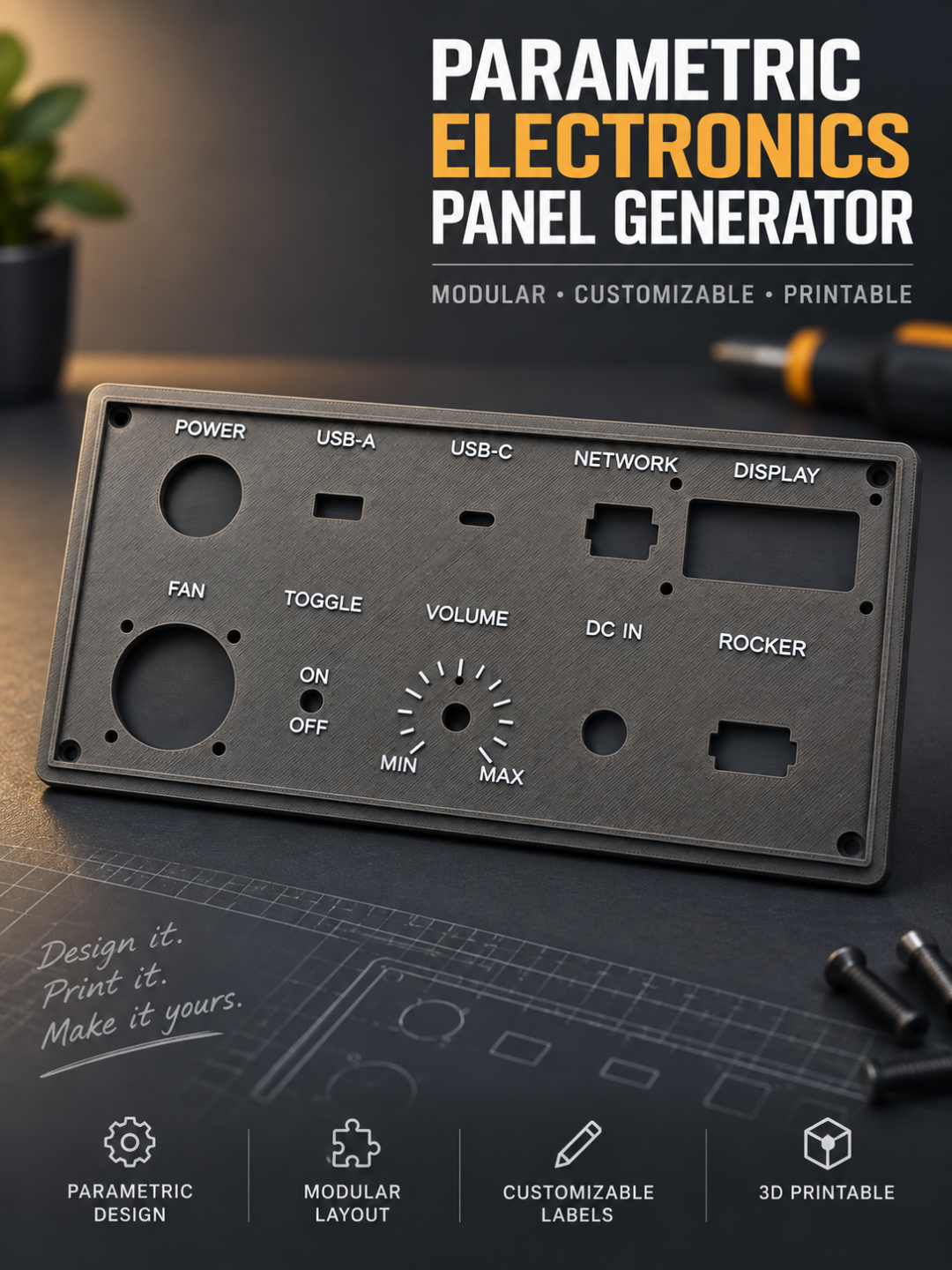
Boost Me Thank You :) Parametric Electronics Panel Generator Create fully customized front panels for electronics projects directly in MakerWorld’s Parametric Model Maker. This generator combines a configurable base plate, component-specific cutout presets, fan openings, mounting holes and optional labels in one single OpenSCAD file. It is designed for control panels, power supplies, workshop equipment, enclosures, test stations, model-making projects and other custom electronics applications. INFO: use always the latest Version!!! Customizable panel The base panel can be adjusted to fit the required enclosure or installation area. Available panel settings include: panel width and height panel thickness rounded corners upper edge chamfer optional raised border four optional mounting holes optional countersinks manual or automatic cutout arrangement The model is centered around the origin and has a completely flat underside for easy printing. Up to 10 configurable cutouts The panel supports up to ten independently configurable component positions. Each cutout can be: enabled or disabled positioned individually rotated freely arranged automatically in a grid combined with mounting holes combined with anti-rotation holes combined with side locking reliefs labeled separately Selecting None disables the corresponding cutout. Included cutout types The generator includes basic geometric openings as well as presets for common electronic components. Available types include: round hole slot rectangle rounded rectangle USB-A USB-C RJ45 toggle switch rocker switch potentiometer rotary encoder display standard fan sizes custom fan XT60 Neutrik D24 The component presets use different starting geometries and optional secondary openings. Manual dimensions can still be used when a specific component differs from the preset. Because component dimensions vary between manufacturers, the actual part should always be measured before printing the final panel. Fan cutouts and ventilation grills Fan cutouts include the central airflow area and the corresponding mounting-hole pattern. Available fan options include several standard sizes and a fully customizable fan type. Different ventilation styles can be selected: open circle cross radial slots honeycomb concentric rings The grill rotation, bar width, opening size and mounting-hole dimensions can be adjusted. Individual component labels Every cutout can receive its own text label. For each label, the following can be configured: label text engraved or raised style position above, below, left or right text size text depth or height distance from the component additional X and Y offset independent text rotation The label is positioned relative to the associated component and moves together with it when the cutout is repositioned. Typical labels include: POWER USB NETWORK DISPLAY FAN INPUT OUTPUT RESET VOLUME ON / OFF All component labels can also be disabled globally. Optional panel title A separate title can be added to the complete panel. The title can be placed at the top or bottom and can be either engraved or raised. Possible applications include: CONTROL PANEL POWER SUPPLY FAN CONTROLLER TEST STATION WORKSHOP CONTROL BATTERY MONITOR The title size, depth, edge distance, position and rotation can be adjusted independently. Automatic layout When automatic layout is enabled, all active cutouts are placed in a configurable grid. The user can define: number of columns horizontal spacing vertical spacing complete layout offset Individual cutout dimensions and rotations remain active, while their manual position values are ignored. Typical applications The generator is suitable for: electronics enclosures control panels bench power supplies workshop machines fan controllers test equipment Raspberry Pi and microcontroller projects audio equipment vehicle and camper installations robotics and model making custom switch and connector panels Printing The panel is designed to print with its flat rear side directly on the build plate. In this orientation: the chamfer faces upward countersinks face upward engraved labels remain visible raised labels are printed on top supports are normally not required For mechanically loaded panels, use a suitable material and sufficient wall thickness. Important note The included presets are intended as practical starting points. USB modules, RJ45 sockets, switches, displays and other components are not fully standardized between manufacturers. Always measure the actual component and verify: main opening dimensions mounting-hole spacing locking tabs panel thickness requirements required printing tolerance V2 includes XT60! Thanks to everyone for the great help :) To all the KARENS out there: Just because OpenSCAD is open-source software, it doesn’t mean that the models created with it—or their source code—automatically have to be open source as well. I make my code available so that interested people can generate models from it. However, that doesn’t mean I’m waiving all rights to my work or am obligated to release the code under an open-source license. If you don’t agree with this, you don’t have to use the model. The internet offers a virtually limitless selection—if something isn’t to your liking, you can simply move on and choose a different solution. Deliberately engaging with something you don’t like, only to complain about it afterwards, makes little sense. To put it another way: it’s like seeing dog poop on the sidewalk, intentionally stepping in it, and then getting upset about it. So, here is my request: please respect the decisions made by the respective developers and creators. Anyone who wants to use the model is more than welcome to do so. Anyone with different expectations regarding licensing can find plenty of alternatives online.
💬Baskı İncelemeleri & Yorumlar(0)
★4.9 / 5.0· Başarılı Baskı