

Download, slice and print this model in the MakerSpell app — available on Android and Windows. Get the app
Model Overview & Print Notes
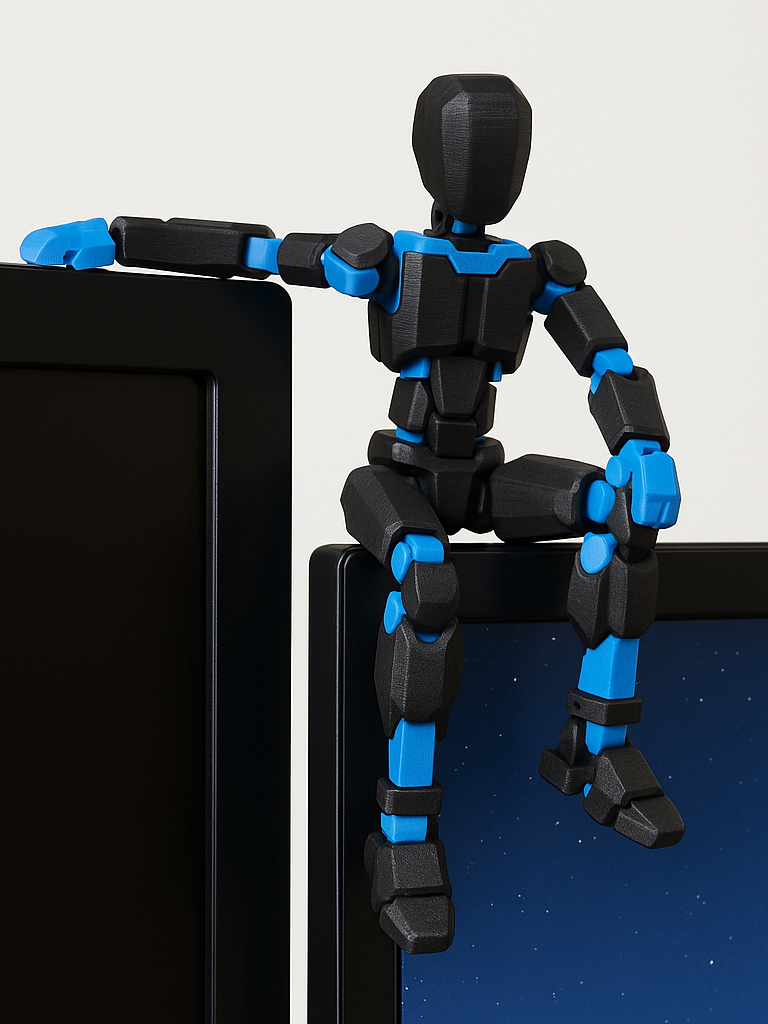
NEW VERSION 1.0 AVAILABLE ━━━━━━━━━━━━━━━━━━━━━━━━━━━━━━━━━━━━ ✅ Dummy 13 v1.0 – Optimized Joints + kit card 🔘 [ Click to go to Dummy 13 v1.0 ] Boost Me ━━━━━━━━━━━━━━━━━━━━━━━━━━━━━━━━━━━━ remix version of the DUMMY 13 Printable Jointed Figure (beta files) , designed to sit on the edge of a monitor or shelf. Printable on a single plate with only 1 color change . This remix of the DUMMY 13 Printable Jointed Figure (beta files) is optimized to act as a “monitor guardian”. The joints allow you to position the character sitting on the edge of the screen, with one hand gripping the bezel and the legs hanging down. Fully articulated figure Proportions optimized for sitting on monitors and shelves Ideal for two-color printing (e.g. black structure + colored details) Designed to be printed on a single plate with one color change It is a simple model to print but very scenic once placed on your PC workstation. Remix & credits This model is a remix of: DUMMY 13 Printable Jointed Figure (beta files) I adapted the scale and print settings to obtain a version suitable for sitting stably on the edge of a monitor and to facilitate two-color printing with a single filament change. Remember to link the original model in the Remix/Credits section of the platform you use. Recommended Print Settings Scale: 95% (optimal size for a standard monitor and to fit entirely on a single plate) Layer height: 0.2 mm Nozzle: 0.4 mm Recommended material: PLA (use your standard PLA profile settings) Infill: 15–20% (any standard pattern is fine) Walls: 2–3 Supports: not necessary (all parts are designed to be printed without supports) Build plate adhesion: brim if you have issues, otherwise not mandatory Quality and Adhesion: First layer slower for better adhesion (e.g. 50% of normal speed) Make sure the build plate is clean before printing for the best possible result Color Change Management: Print “by object” to minimize color changes Print profile designed for a single color change (e.g. body one color and details another) You can use a layer pause / M600 command for filament change (depending on your printer) Assembly / Posing Tips After printing, gently move all joints to unlock them. Position the dummy sitting on the edge of the monitor or a shelf. Use one hand of the model to “hook” onto the edge to increase stability. You can adjust the position of the legs and arms to find the best balance.
💬Baskı İncelemeleri & Yorumlar(0)
★4.9 / 5.0· Başarılı Baskı