
Periodic Table Jigsaw – Play & Learn
Download, slice and print this model in the MakerSpell app — available on Android and Windows. Get the app
Model Overview & Print Notes
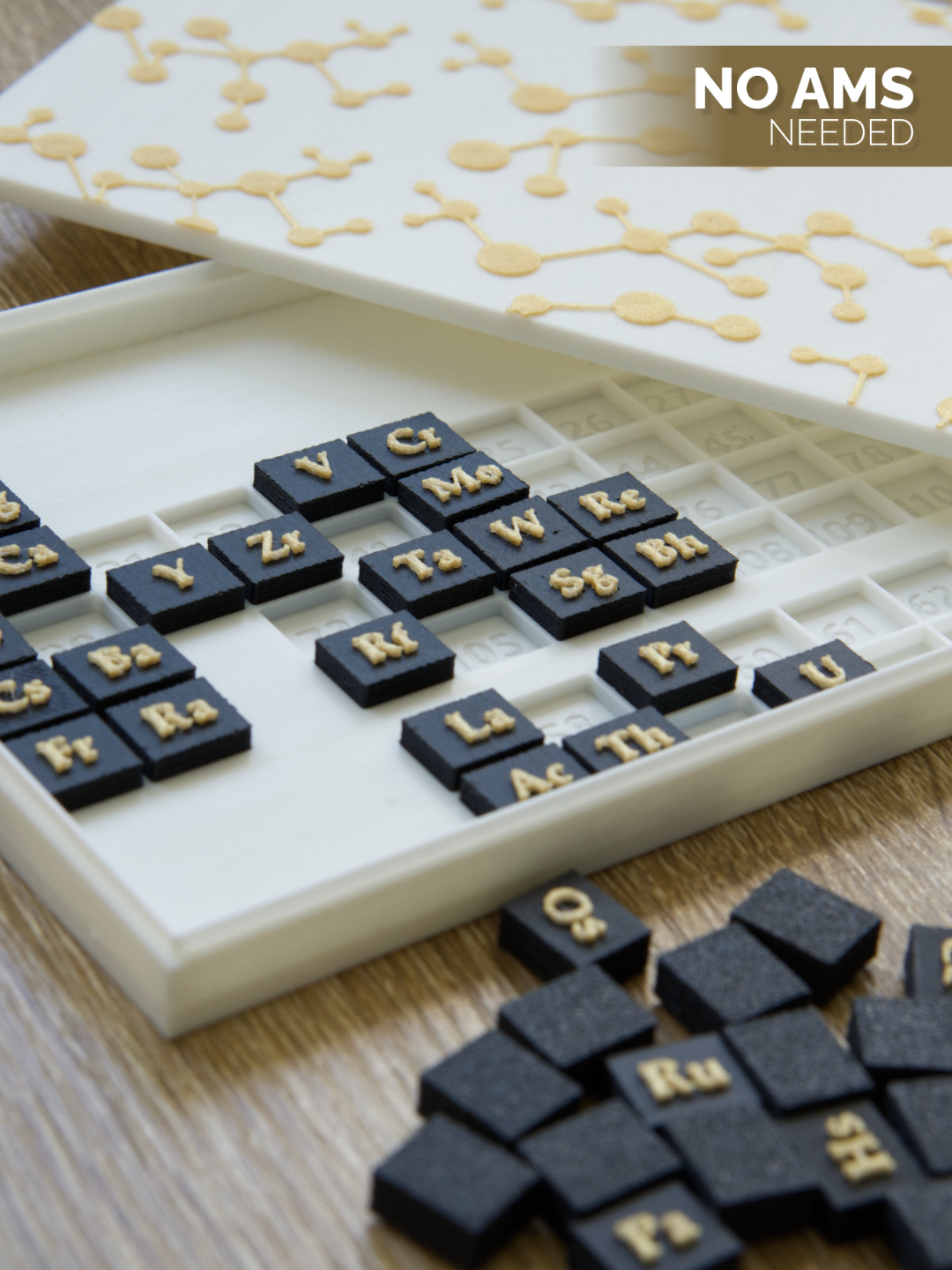
A simple print-and-play puzzle based on the periodic table . Combines learning with playing. Doesn't need AMS, contains g-code pauses for changing colors - more explanation below. For a tiny educational twist : instead of putting atomic numbers directly on the tiles, I’ve engraved them underneath each one. So once you've solved the puzzle, you can lift the pieces and peek underneath if you’re curious. Boost Me If you like the model, consider boosting. It gives me the energy to create more - thank you!! (ノ◕ヮ◕)ノ*:・゚✧ Model parts the base with cutouts for all the elements tiles with element symbols an optional lid with a decorative pattern Color swaps - without AMS On the photo you’ll see a two-color print – but no AMS system is needed . Instead, I’ve used layer-based filament swaps triggered by short pauses in the g-code. That lets you change the filament mid-print without any special hardware. When the print stops by itself, unload the filament and load the new one - just like you do normally. Then resume the print. Color swaps are used for: the lettering on the element tiles (symbol and background in different colors) the pattern on the lid If you don’t want to deal with filament changes, just remove the pause from your sliced file or press “Resume” when the printer stops – it’ll continue printing in the same color. Layout Notes Please note that periodic table layouts can vary , especially when it comes to the placement of Lanthanides and Actinides. Sometimes you'll see Lanthanum (57) and Actinium (89) directly under elements 21 and 39, other times it's Lutetium (71) and Lawrencium (103), or nothing at all — with the full Lanthanide and Actinide series placed in a separate row below. I chose this layout because I found it the clearest and most visually balanced for this format. As a reference, I used the official IUPAC Periodic Table of Elements (https://iupac.org/what-we-do/periodic-table-of-elements/). Printing settings To get the best visual effect, especially on the fine top details, ironing has been enabled and slightly slowed down, set to Top surfaces . If you're in a hurry, you can change this: set ironing to Topmost surface only, speed it up a bit, or even disable it entirely - but please have in mind that it may be risky. It might be worth testing on the lid , but I don’t recommend turning it off for the base or the letter blocks , where clean top layers matter most. Filaments I used: Bambu PLA Basic Jade white for base and lid, Polymaker PolyTerra PLA Charcoal Black for tiles Fiberlogy Easy PLA True Gold for lettering and pattern Printer I tested on: Bambu Lab P1S Hotend: 0.4 mm Stainless Steel Please let me know it you have any suggestions on how to improve my future prints :) Thank you for your time <3 Check out also my other projects: A Triceratops Jigsaw Puzzle :) Tetris-inspired geometric jigsaw puzzle