
Hiking and Cycling Map Generator | TrailPrint3D

Download, slice and print this model in the MakerSpell app — available on Android and Windows. Get the app
Model Overview & Print Notes
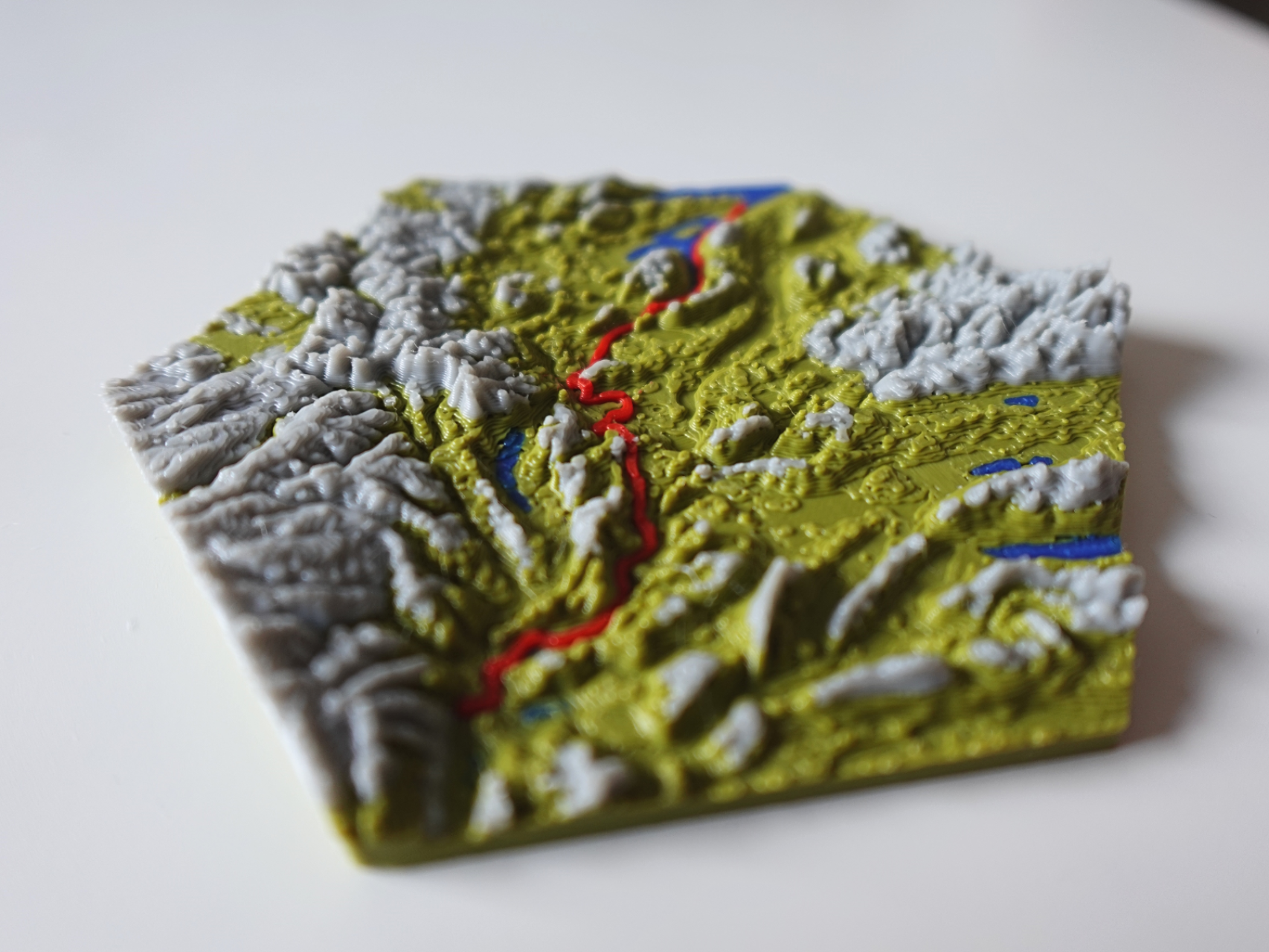
IMPORTANT CHANGES! (24 April 2026) Makerworld no longer allows to upload .py files. I created a website from where you can download the latest version for free without having to create a account: TrailPrint3D.com Boost Me Support my work by Boosting this Model INTRODUCTION This is a Addon for Blender that allows you to create Miniature Maps of your adventures from just the GPX file that you can download from Komoot, strava, garmin or other tracking apps! SUPPORT MY WORK PATREON Buy me a Coffee Get Help and share your Creations on my Discord server: Join Discord HOW TO INSTALL Please Watch the Video on Top first as it contains a full Installation Guide and Addon Tutorial Download the latest Blender version from https://www.blender.org/download/ Download the Addon (.zip file) from https://trailprint3d.com Open Blender, and go to Edit → Preferences Go to the Addons tab, Click the top right Arrow and then “Install From Disk” Select the .zip file file you downloaded from TrailPrint3D.com Close the popup window If the sidebar is not showing, Press “N” If “TrailPrint3D” is displayed there, the installation was a success PARAMETERS Generate Button: Generates the Map with your Current set parameters File Path: The .GPX file you want to import. Click the little folder to open a File Explorer Export Path: The Folder the STL files will be saved Name: The name of the save file. Keep it blank to use the name of the file Shape: The shape of the Map Object size: The size of the Map in mm Resolution: The “Quality” of the map. Higher = Better quality but also longer Generating times. i reccomend a maximum of 6 or 7 ( 7 takes up to 10 minutes). Elevation scale: Multiplier to the elevation. Use it to make flat maps more interesting or to flatten down steep landscapes Path thickness: the thickness of the path SingleColorMode Trail: Creates a cutout of the Trail in the map and the Trail as a part that can be printed separately Path scale: The size of the path compared to the map. If your object size is 100 and Path scale is 0.5, then the path is about 50mm big. if pathScale is 0.75 its about 75mm big. Advanced Parameters (In the Advanced Tab) Export STL/OBJ/3mf: Export the Currently selected Object as STL or OBJ if it has materials applied to it (3mf if you have the 3mf Addon by Clonephaze installed. Can be installed from within the Addon) Disable Auto Export: Dont create Files with each Generation Map : Parameters about the Map minThickness: Thickness of the thinnest point of the map in mm ShapeRotation: Rotates the shape. Useful for shapes like the hearth where you need to rotate the shape so the path fits perfectly on the map xOffset: Offset of the map in X Direction to the center of the path yOffset: Offset of the map in Y Direction to the center of the path Snap Trail to Terrain: Ignores the elevation from the .GPX and projects the Trail onto the map Fixed elevation Scale: The difference between the highest and lowest point on the map will be 10mm Tolerance: The tolerance for Single-color mode of the Trail and the Elements Multi Generation (Patreon Version): Allows you to Generate a Map from multiple .GPX files Include Elements: Element handling: Paint on Map: Paint the Colors directly onto the Mesh → Default Single-color mode: Generates the Elements as separate objects with cutouts in the map Separate objects: Generates the Elements as separate objects that can be placed “above” the map in your slicer Water & Ocean: Ponds & Lakes: Include Ponds & lakes Big Rivers: Includes big main Rivers Small rivers: Includes every small river (Only use this for smaller maps) WaterTreshold: polygons with a surface area thats smaller than the Treshold will be ignored (to remove and filter out “noise”) Include Ocean: Generates and colors the Ocean Flip Ocean Side: Ocean calculation is still not perfect. sometimes its mirroring it and the land gets viewed as the ocean. in that case enable this Forests/Scree/City Boundaries/Greenspaces/Farmland/Glaciers: Creates the Elements if they are occuring on your Map Treshold: Polygons with a surface area thats smaller than the Treshold (in blender units) will be ignored (to remove and filter out “noise”) Buildings: Include Buildings: Generates Buildings for your Map (Not reccomended for massive maps) Height Multiplier: Multiplier to the Building height Roads: Big Streets: Generates Primary roads and motorways Medium Streets: Secondary tertiary roads Small Streets: Residental, living streets, service, footway (Dont use for bigger maps) Street width multiplier: Multiply the thickness of the roads Pin: Place Pin Opens interactive View that allows you to place the Pin on any position you like Cityname (Patreon Version): Enter a Cityname Pin on City (Patreon Version): Place a Pin on the Cityname Special (Patreon Version): Allows you to Create Jigzaw puzzle and sliding puzzles Post-Process: Mountain Coloring Mountain Treshole: The Treshold at what height mountains should start Color Mountains: Paint the Currently selected Map from the given Treshold Contour Lines Contour Line Thickness: Thickness of the Contour lines (reccomend layer thickness or a multiple of it) Contour Line distance: Distance from the start of one contour line to the next one Contour Line offset: The offset at what height the Contour lines should start Contour Lines: Generate the Contour Lines as a separate Object Magnet Holes: Magnet holes: Set a Magnet diameter and height, press “Add Magnet Holes” to add Magnet holes on the bottom of the currently selected Map Dovetail Connection system: Add dovetail Cutouts: Add Dovetail Cutouts to the Currently selected Map (STL files for connectors can be downloaded from this project page) Bottom Mark: Add Bottom Mark: Add the Object Name to the Bottom of the Map (For better identification) Bottom mark cutout: Enable this so the Bottom mark cutout will be a negative instead of a separate object SVG/Text Import: Opens Interactive Window that allows you to Place Text or a SVG file (compatible with Single-color-mode, but only on the map) Import 2D Heightmap (Patreon Version) Preset: Save and load Presets Load Preset: Load the currently selected preset Save Preset: Save your current Settings under a Name you can Enter Delete Preset: Delete the currently selected preset API: Select from one of 4 Diffrent APIs. Terrain-Tiles is selected by default. Only switch if you have problems with one of them. OpenTopography requies an API key that can be registered for free on their website but is really fast and reliable Additional Info: Generation Settings: Select a Map and click this Button to get infos about the Generation settings of that Map Mainly for debugging, finding Errors or to check what settings were used to create a map Attribution: Credit to the Datasources that made the Addon possible Shape Parameters: When a shape with Text is selected a new Panel “Additional shape settings” appears at the bottom of the sidebar Font: Set the font of the Text Text Size: Set the size of the Text Text Size Title: Optional Text size for the Title. Plate Text Customize the Text using Icons (Premium Version) and your own text as well as predefined string {name} = Name varialbe {length} = trail length {elevation} = traveled elevation {duration} = how long the trail took (if available in the GPX file) {date} = on what day the trip was made (if available in the GPX file) {speed} = average speed Plate Thickness: Thickness of the Baseplate BorderSize: Size of the base compared to the Size → 20% means Base is 20% Bigger than the map PlateInsertvalue: Insert into the Plate for better alignment of the Map if Plate and Map are printed separately TextAngle: angle of the Text rotated around the center Plate Bevel: Bevel the outside edges of the Plate FILAMENT IM USING I usually use 5 Colors (Reflinks) Green as basecolor Red for the path Blue for water Grey for mountains Dark Green for Forests PATREON VERSION I Spend hundreds of Hours on this Addon, Improving, Testing, and you can downlaod it here for Free. But Without my Patreon Supporters that wouldnt have been possible. Thats why the Patreon Version has some Extra Features and you can also get them by Supporting my Work. Here are some of the Extra Features Special Shapes inkl Tutorial (Sliding Puzzle or Jigzaw Puzzle) Place Pins by Entering a City name Chain Together multiple .GPX files together to a single one Create Maps that contain multiple .GPX files Create custom Shapes Extend Maps endlessly 2D Heightmap on Bottom of the Map