
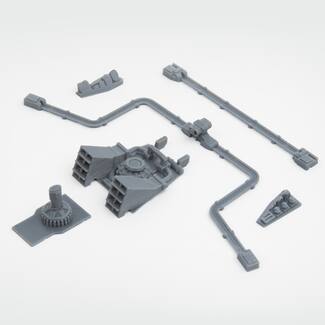

Time machine add on parts for Delorean
Download, slice and print this model in the MakerSpell app — available on Android and Windows. Get the app
Model Overview & Print Notes
This is the part that turns the folding car DMC into a time machine in the movie Back to the Future. There are six parts in all. Delorean is not included. Delorean must be purchased separately. Delorean download link ➪ The order of attaching parts is as follows. 1. First remove the engine cover on the rear of the car and the parts on the side of the windshield. 2. The front time travel coil should be folded in two places and glued to the groove. 3. Apply glue to each of the parts of the rear side window of the car. 4. The rear long time travel coil folds the six slotted grooves inside. 5. Apply glue to the part that touches the body of the car and paste it from the upper part of the car to the side and the lower part in order. 6. Apply glue to the part( Nuclear Reactor / steam vents) on top of the engine cover. 7. Finally, Fold and paste Mr. Fusion. Please refer to the video below and be sure to position and work before applying the glue. Attachment process ➪
💬Baskı İncelemeleri & Yorumlar(0)
★4.9 / 5.0· Başarılı Baskı