
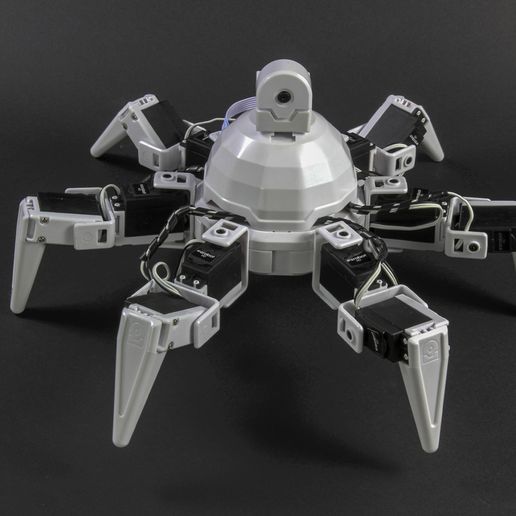
Model Overview & Print Notes
The parts from this hexapod can be 3D printed and clipped together. You don't have to stick with this configuration. If you want to build something different, simply clip the parts to build a custom robot. You can see it working here: https://youtu.be/vsrR78Q1Sgw ## 3D Printing Settings Once 3d Printed, the parts clip together. There are instructions with photos here: https://www.ez-robot.com/learn-robotics-getting-started-with-the-hexapod-robot.html Here is how the parts clip together: https://youtu.be/0cKnZqX2XkM The servo mounting holes can be difficult to fit onto the servo output gears. Here's a tutorial to help you along the way: https://synthiam.com/Community/Tutorials/Strengthen-Servo-Splines-in-3D-Printed-Brackets-17948 The servos used in this robot's legs are here: https://www.ez-robot.com/store/p16/servo-motor/Heavy-Duty-Servo-Motor/DIY-Servo-Motor.html The camera for the head is here: https://www.ez-robot.com/store/p64/robotics-camera.html The EZ-Bv4 Robot Controller Brain is here: https://www.ez-robot.com/store/p24/EZB-smart-robot-controller.html The LiPo battery is here: https://www.ez-robot.com/store/p25/robot-power/lipo-battery.html The internal wiring harness + power switch is here: https://www.ez-robot.com/store/p89/wiring-harness-short.html The iOS and Android App can be downloaded here: https://www.ez-robot.com/mobile-robot-software.html Windows software for programming this robot can be found here: https://www.ez-robot.com/pc-robot-software.html infill: 30% material: PLA raft: Yes supports: Yes




💬Cults3D Community Comments(...)
★Cults3D Original Reviews