
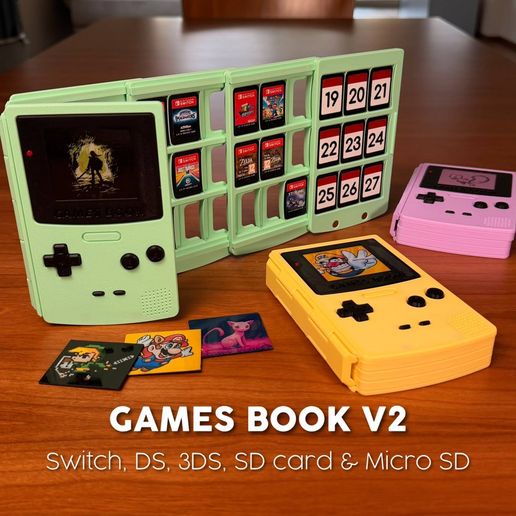

GAMES BOOK V2 | SWITCH, DS, 3DS, SD CARD & MICRO SD

Download, slice and print this model in the MakerSpell app — available on Android and Windows. Get the app
Model Overview & Print Notes
**💸 Enjoy a 20% discount when you buy it directly from my official [website](https://www.af-inventions.com/design.html?slug=games-book)** *** **UPDATE v4 - April 13** - Added **pages for Nintendo DS, Nintendo 3DS and SD memory cards** - Updated the Nintendo Switch page; you can now **combine pages** (e.g., 3DS + Switch + SD in a single Games Book) - Added instructions for **printing holographic images** **UPDATE v3 - March 22** - **Improved _COVER - BACK_ & _COVER - BACK - BLANK_:** Improved sliding mechanism - **3D images added:** added lots of images ready for 3D printing! **UPDATE v2 - March 19** - **Improved _COVER - BACK_:** Improved the MicroSD slots for a smoother, easier fit. - **Added _COVER - BACK - BLANK_:** A clean version without the SD card slots for those who prefer a minimalist look. *** The **GAMES BOOK** is a functional tribute to the iconic Game Boy Color, reimagined as a high-capacity "book-style" library for your Nintendo Switch media. *** Why you’ll love it: - **Massive Capacity:** Flip through pages to find your next adventure! It holds up to 27 Switch cartridges. - **Spring-Loaded Security:** Each slot features a precision-engineered integrated spring, ensuring your games stay snug and won't fall out. - **The "Secret" Page:** The final page includes dedicated slots for 9 Micro SD cards—perfect for your digital library. - **Fully Customizable "Screen":** Make it yours! The front screen is a swappable plate. I’ve included a Chroma Canvas / HueForge tutorial and settings file so you can print your favorite game scenes with stunning color depth. - **Magnetic Snap:** Uses two magnets (D=6mm - TH=2mm) for a satisfying, secure tactile closure. *** 💡 **PRO TIP: Smooth Scrolling!** If the pages aren't sliding as smoothly as you’d like, don't worry—there’s a classic "old school" fix! Take a candle (unlit!) and gently rub the wax along the sliding rails. You only need a tiny amount. The wax acts as a dry lubricant, and your pages will slide like butter! *** **ASSEMBLY GUIDE** Follow these steps to put your GAMES BOOK together in just a few minutes: - **Cover Assembly:** Connect the main shell components (COVER - FRONT, BACK, and SPINE) by simply snapping them together. You should hear a clear "CLICK" confirming they are securely locked. - **Control Panel:** Glue the BUTTONS section onto the front cover. - **LED Detail:** Glue the RED LED piece into its designated slot on the BUTTONS panel. - **Stacking the Pages:** Stack the pages onto the back cover. Start with the 2x PAGE and finish with the PAGE - FRONT. Pro Tip: Position each page halfway over the previous one and press down firmly to snap them into place! - **Magnetic Closure:** Glue the 4 magnets into their respective housings. Make sure to double-check the polarity before the glue sets to ensure a perfect snap! - **Customization:** Simply snap your favorite printed image (using the included Chroma Canvas profile) into the screen slot. *** **OTHER VIDEO & PHOTO** If you want to see more videos or photos of this design follow me on my [_Instagram_](https://www.instagram.com/af_inventions) or [_TikTok_](https://www.tiktok.com/@af_inventions)! *** _**COMMERCIAL LICENSE** Purchasing or downloading this file does not give you the right to sell physical prints of this design. You can obtain a commercial license for all my designs by signing up to my [_Thangs_](https://than.gs/u/3123610?plans=true)._ ## 3D Printing Settings 3MF / STL / PDF FILES
💬Baskı İncelemeleri & Yorumlar(0)
★4.9 / 5.0· Başarılı Baskı